Contents8 sections
- What the Postman AI plugin report actually shows
- What changed on your machine
- Where your data can go: API key exposure paths
- How to check and remove it, step by step
- What teams should do: policy, AI settings and network controls
- A checklist for AI features in dev tools
- Frequently asked questions
- Sources and references
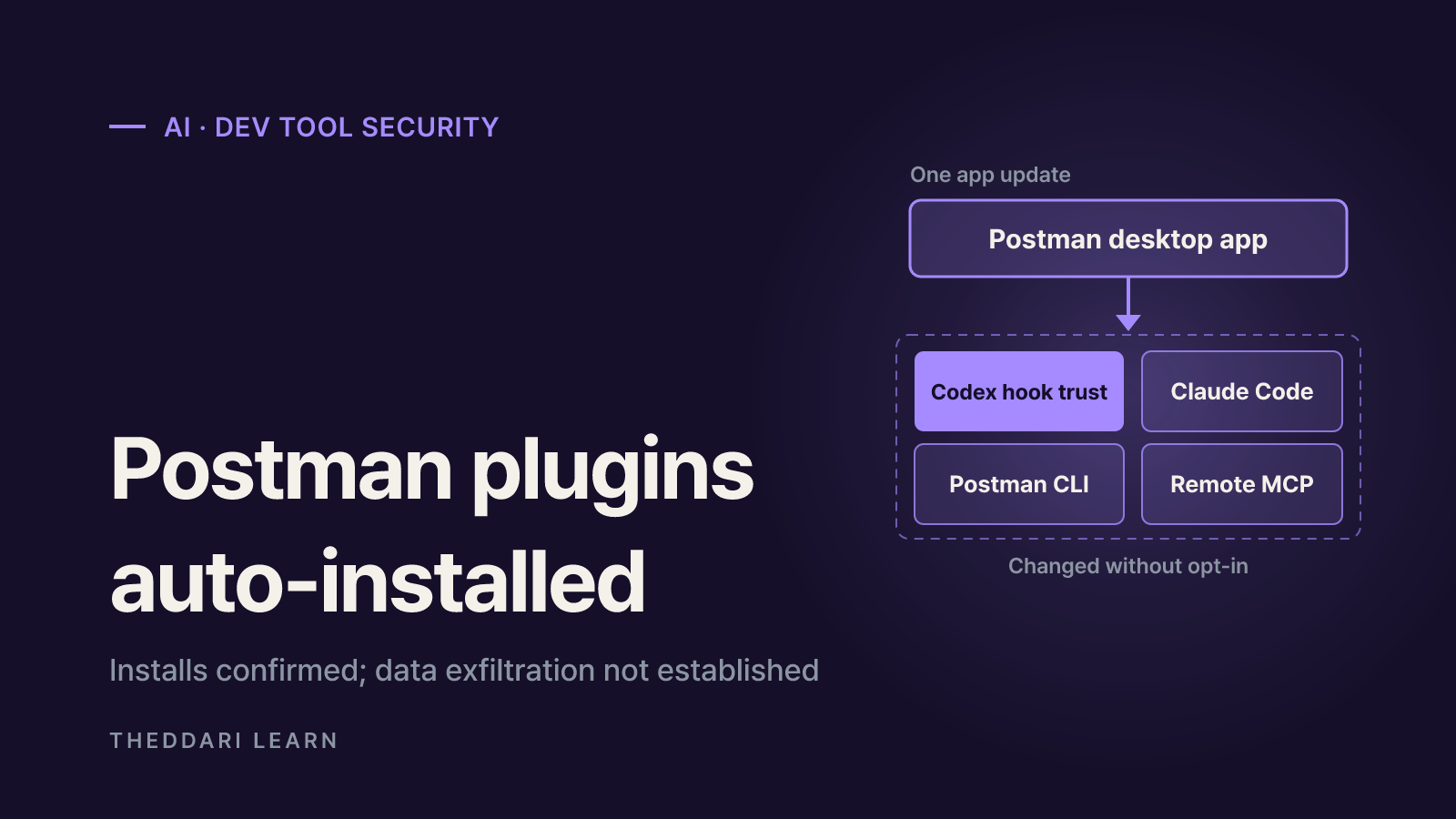
The Postman AI plugin controversy is about consent, not proven data theft. As of November 4, 2026, a public GitHub issue and Postman's own documentation show that the Postman desktop app, during an update, installed its plugin, a session-start hook, a remote MCP connection and the Postman CLI into developers' coding agents such as Claude Code and Codex. What has not been shown is that any API data was actually uploaded. This guide separates the confirmed facts from the viral headline, explains where data can realistically flow, and walks through how to check and remove the integration on your machine and across a team.
What the Postman AI plugin report actually shows
On October 25, 2026, a developer opened issue #14370 on Postman's public support repository. After opening Postman desktop 12.33.4 on a Mac, they noticed Codex loading Postman skills for unrelated API work and repeated MCP authentication warnings. They quoted Postman's own main.log from October 24 showing an install with the source auto-existing-upgrade and results claude-code:installed and codex:installed. The story reached the top of Hacker News under the headline that Postman "attempts to share all API data", but the reporter wrote plainly that the report does not claim to establish data exfiltration.
On November 3, a second user reported the same path on a later build. An existing signed-in Postman install updated from 12.31.3 to 12.35.1 on launch, then installed the CLI and the Claude Code and Codex plugins, with Cursor logged as already installed. That user found no hook trust record in their Codex config. So two machines hit by the same auto-install can still carry different traces, which is why checking your own files matters more than reading someone else's list.
Agent plugins installed automatically on update
- Status as of Nov 4, 2026
- Shown in user logs on at least two machines
- Basis
- Issue #14370 and comments
Installer approves its own Codex startup hook
- Status as of Nov 4, 2026
- Approval behavior documented by Postman
- Basis
- postman-plugin README
Remote MCP server registered
- Status as of Nov 4, 2026
- mcp.postman.com found in config
- Basis
- Issue #14370
Attempts to share all API data
- Status as of Nov 4, 2026
- Not established; reporter does not claim it
- Basis
- Issue #14370
Bundling disclosed on the download page
- Status as of Nov 4, 2026
- Sentence present now; timing disputed
- Basis
- Downloads page and a thread comment
Postman's position came through the issue thread. A reply in Postman's voice, quoted by other commenters, said the CLI and agent plugins are bundled with the desktop app because many users had trouble installing and wiring them up separately, that this is mentioned on the download page and in the update flow, and that the components can be uninstalled inside the app. It added that Postman would make the opt-in clearer for existing users and is reviewing the hook approval and session-start behavior. The Postman downloads page does now say the app includes Postman CLI and Postman plugins. One commenter argues an October 26 archive copy lacked that sentence, so whether users were told in advance remains disputed.
What changed on your machine
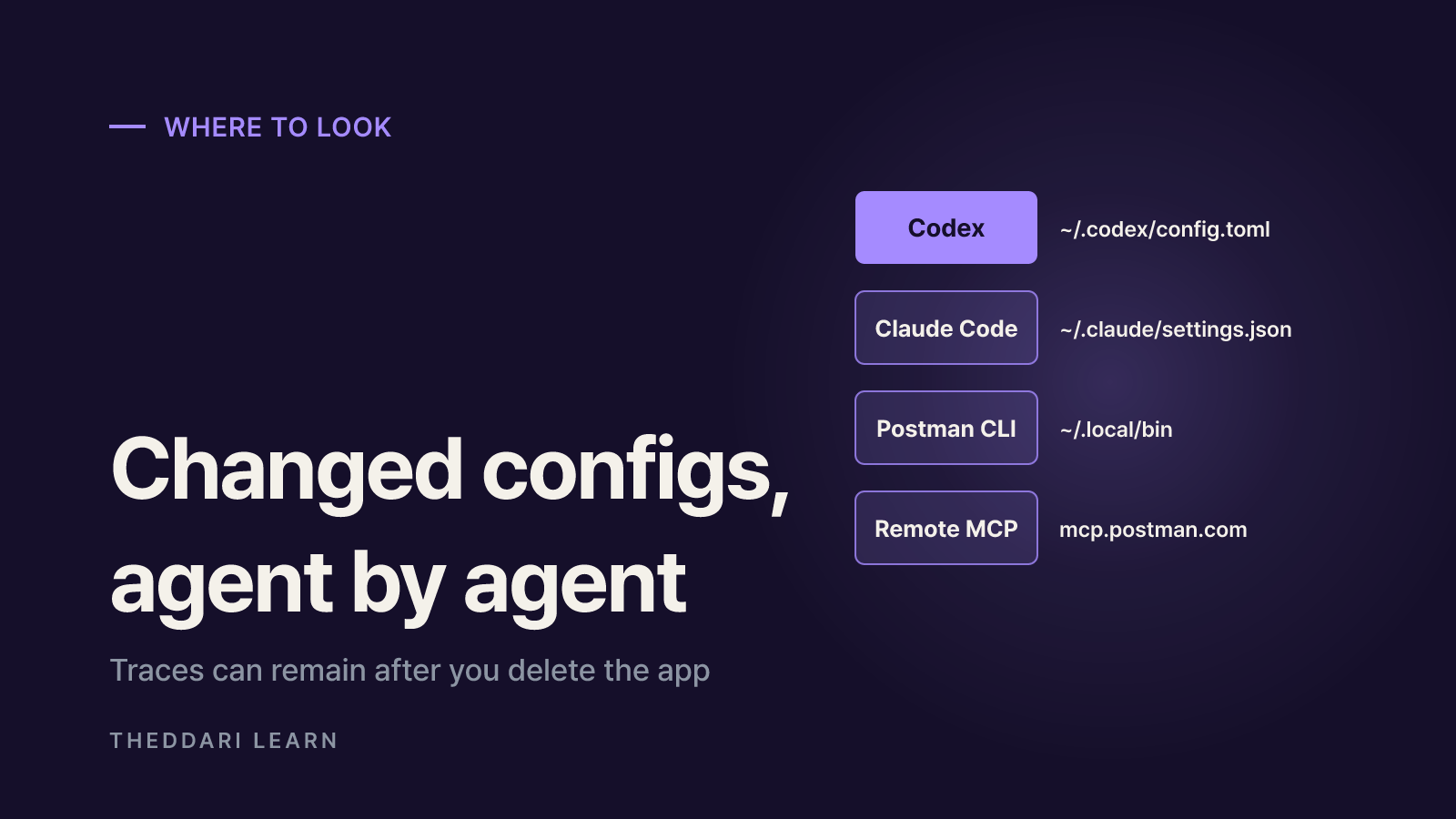
According to the Postman plugin README, a single npx @postman/postman-plugin command installs into every compatible agent it detects: Antigravity, Claude Code, Codex, GitHub Copilot CLI, Cursor, Factory Droid, Kimi Code, OpenCode and Pi. The issue documents only some of these, but if the same installer ran on your machine, the others are worth checking too.
Codex
- Reported change
- Postman marketplace, plugin enabled, hook trust entry
- Where to look
- ~/.codex/config.toml
Claude Code
- Reported change
- postman@claude-plugins-official enabled at user scope
- Where to look
- ~/.claude/settings.json, installed_plugins.json
Remote MCP
- Reported change
- Connection to mcp.postman.com/mcp
- Where to look
- Plugin MCP config
Postman CLI
- Reported change
- postman executable added
- Where to look
- ~/.local/bin
Postman log
- Reported change
- auto-existing-upgrade install record
- Where to look
- ~/Library/Application Support/Postman/logs/main.log (macOS)
The Codex session-start hook is the most sensitive piece. It fires on startup, clear and compact, and per the issue it tells the agent to load the postman:api-engineer skill before any non-trivial API engineering task. In practice, general API work can be steered toward Postman even when you never asked for it. The Codex hooks documentation says non-managed hooks must be reviewed and trusted before they run, with trust recorded against the hook's hash. Postman's README states that its npx installer approves that session-start hook, which moves a user decision into the installer.
Where your data can go: API key exposure paths
Installation and data transfer are different questions. To its credit, the Postman plugin README spells out the paths through which data reaches Postman. Three matter most.
- Workspace publishing: once a folder is connected to a Postman workspace via
postman init, collection runs, test results, lint results and request activity are published by default. You can turn this off per command with--report-events=false. - Remote MCP fallback: the plugin registers Postman's hosted MCP server for when the CLI cannot run. The README says MCP tool calls reach Postman by design and are not governed by the CLI flags, and suggests skipping the MCP server if you do not want that path.
- Anonymous usage counts: the CLI records command usage counts without workspace, user or payload data attached.
For API key exposure, the risk sits in what the agent handles. Coding agents can read .env files, test environment variables and request headers. If a startup hook nudges API tasks toward Postman skills and you have signed in to the MCP server, request bodies or headers could be passed to Postman's cloud along the way. In the original report the MCP connection failed with an authentication error, so that path never opened. The useful question is not just whether the plugin was installed, but whether a signed-in MCP session or workspace connection could have carried secrets.
The Codex docs note that oversized hook output can be saved to a temp directory and advise against returning secrets in hook output. Check that none of your own or plugin hooks print environment variables.
How to check and remove it, step by step
Whether or not you keep using Postman, inventory first and decide second. The paths below are for macOS; Windows and Linux use different locations.
- 1
Search the Postman log
Look in main.log for auto-existing-upgrade, autoInstall.plugin or PostmanAgentPluginService. Note the timestamp and which agents were listed; you will compare config file changes against it.
- 2
Inspect each agent's config
In ~/.codex/config.toml, look for a postman marketplace, plugin and hooks.state entry. In ~/.claude/settings.json and installed_plugins.json, look for the Postman plugin. If you use Cursor, Copilot CLI or other agents, check their plugin lists. Back up config files before editing.
- 3
Review Codex hooks
Run /hooks in the Codex CLI to see hook sources, review new or changed hooks, and disable individual non-managed hooks. In the desktop app, use Settings > Hooks. Disable the Postman session-start hook if you did not choose it.
- 4
Remove the plugins and CLI
Postman's documented route is
npx @postman/postman-plugin statusfollowed byremove, optionally with--agent <id>. Note that npx fetches and runs the package from npm again; if you would rather not, remove the plugin with each agent's own plugin commands. Remove only the postman file from ~/.local/bin, since other tools live there too. - 5
Verify, then watch updates
Search the config files again to confirm no Postman entries or hook trust records remain. Keep an eye on the Postman log after future app updates to make sure nothing is reinstalled.
If you want to keep the plugin, at least decide whether to use the remote MCP connection, and whether to pass --report-events=false when working in connected folders. Instruction precedence inside a prompt depends on model behavior; it is not a substitute for blocking at the configuration level.
What teams should do: policy, AI settings and network controls
Cleaning one laptop does not stop the next update, or the next vendor, from doing the same thing. For organizations, the real question is which developer tools are allowed to modify other tools' settings.
- Codex managed requirements: per the Codex docs, admins can set
allow_managed_hooks_only = truein requirements.toml to skip user, project and plugin hooks while still loading managed ones.[features] hooks = falseturns hooks off entirely. - Postman AI access: the Postman support FAQ says Enterprise teams can enable or disable Postman AI at the team level; other plans toggle it per user in Settings > AI.
- Guardrails: Postman's product access docs describe Enterprise guardrails: Secret Scanner (Postman v11.87 or later) scans user data before it is sent to Postman Cloud or LLM providers, PII Redaction is off by default, and MCP Policy defaults to allowing all MCP servers. Review whether those defaults fit your policy.
- Network controls: if your organization does not use Postman's remote MCP, you can block or allowlist that endpoint at the proxy or firewall. Confirm no team depends on it first.
- Change monitoring: watching agent config directories such as ~/.codex and ~/.claude with endpoint management tools lets you catch similar installs as they happen rather than weeks later.
Developer-tool security stories like this one often spread on Hacker News and Telegram channels before vendors respond. The theddari AI Telegram trends and blog trends dashboards can help you spot which tools are being discussed so you know what to audit. They show attention, not verification, so pair them with the original issue and official docs, as this guide does.

A checklist for AI features in dev tools
This is less a Postman-only problem than a trust-boundary problem across the coding agent ecosystem. Plugins, hooks and MCP servers make agents more capable, but they also inject another company's instructions and network paths into your workflow. Before accepting a new tool or update, ask four questions. Does the install stay inside that app, or does it change other tools' global user settings? Does the installer handle any step the user is supposed to approve? Are outbound data paths, such as cloud publishing, remote MCP and usage counts, documented with a way to turn them off? And does uninstalling remove every trace without the next update putting it back?
As of November 4, 2026, Postman has said it will make the opt-in clearer and is reviewing hook approval, but we found no official announcement that automatic installation or self-approval has been removed. Watch the release notes and the issue thread for updates. Until then, the practical response is to check your own machines with the steps above and decide deliberately which data paths you are comfortable leaving open.