Contents7 sections
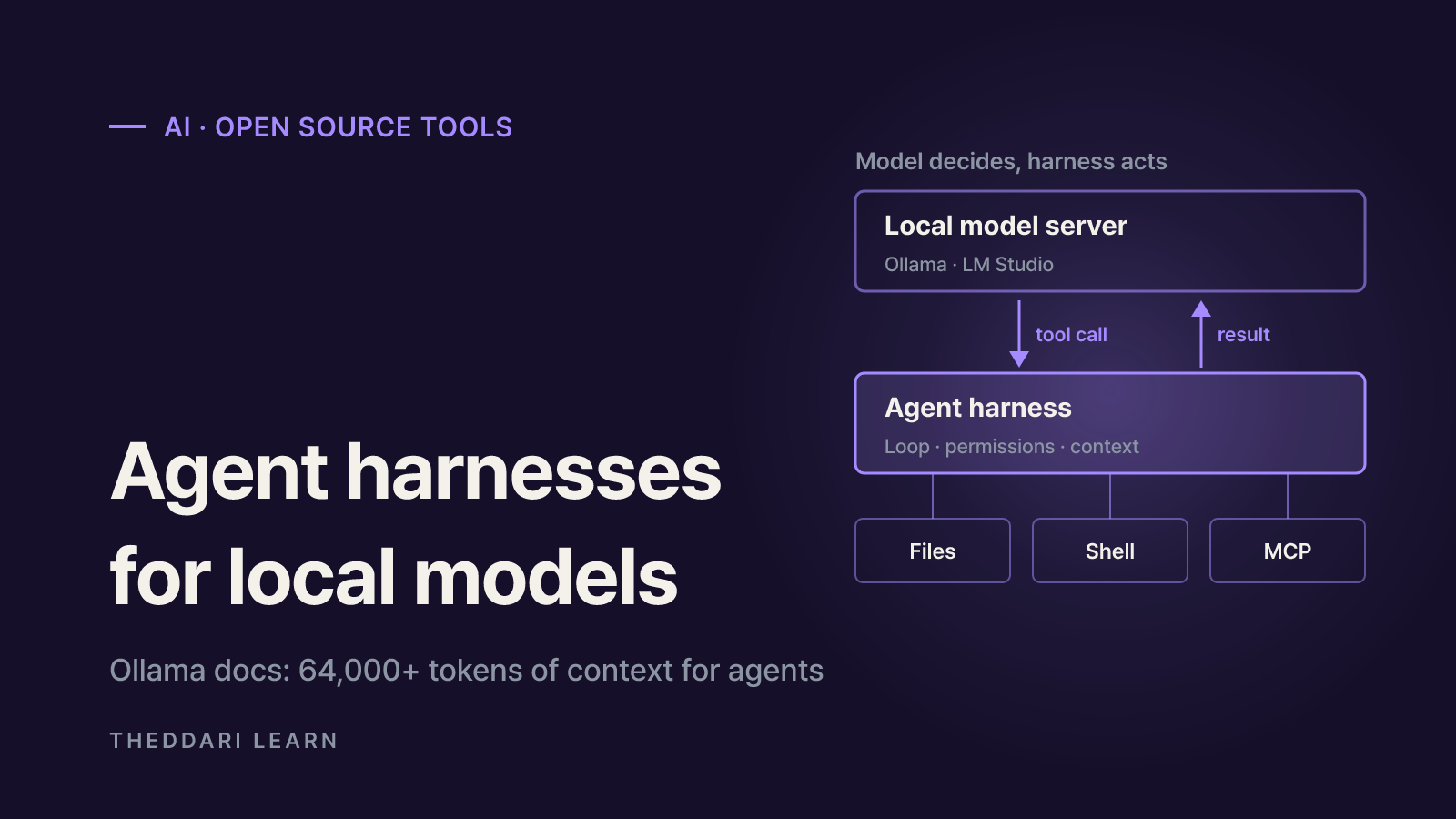
Most open source AI agents are really two pieces: a model and a harness. The harness is the program that wraps the model in a loop of tool calls, file access and permissions, so it can read code, run commands, check results and keep going until a task is done. To run an agent on your own hardware, you pick a local model server (Ollama, LM Studio, llama.cpp or vLLM) and a harness (such as OpenCode, goose, Aider or OpenHands), then make sure the context window and tool-calling support line up. Everything below was checked against each project's official docs as of October 2026.
That is why searches like "open source ai harness" and "open source ai models to run locally" tend to show up together. Downloading a strong model is only half the job. The same weights can act like a capable assistant in one harness and a tool-blind chatbot in another, depending on configuration.
How open source AI agents work: what a harness does
The core loop is simple. The harness sends your request plus a list of available tools to the model. If the model replies with a tool call, the harness runs that tool, appends the result to the conversation and asks the model again. The loop ends when the model stops calling tools. Ollama's tool-calling docs walk through exactly this pattern under the name "agent loop."
In other words, the model decides what to do, and the harness does it and keeps it under control. So when comparing harnesses, look at these features before model benchmarks:
- Built-in tools: reading, writing and editing files, running shell commands, searching code, fetching web pages.
- Permission model: whether edits and shell commands need approval, and whether a read-only mode exists.
- Extensibility: support for Model Context Protocol (MCP) servers, custom tools and custom agents.
- Model connection: Ollama-only, or any OpenAI-compatible endpoint.
- Interface: terminal UI, CLI, desktop app, web UI or API.
Model server vs. harness
Ollama, LM Studio, llama.cpp and vLLM are inference servers: they load model weights and answer API requests. The harness is a client of that API. Because most connections use an OpenAI-compatible endpoint such as http://localhost:11434/v1, switching servers often means changing only a base URL and a model ID. One detail matters for security: tools run on the machine where the harness runs, not on the model server.
Comparing popular open source AI tools for local agents
The table lists only what we could confirm in official docs and repositories in October 2026. Where a license was not checked in this review, it says so rather than guessing.
OpenCode
- Form factor
- Terminal UI, desktop app, CLI
- Local model support
- Ollama, LM Studio and llama.cpp providers; any OpenAI-compatible server
- License
- MIT
- Worth noting
- Switch between a full-access build agent and a read-only plan agent
goose
- Form factor
- Desktop app, CLI, API (Rust)
- Local model support
- 15+ providers including Ollama
- License
- Apache-2.0
- Worth noting
- 70+ extensions via MCP; part of the Linux Foundation's AAIF
Aider
- Form factor
- Terminal pair programmer
- Local model support
- Ollama via the ollama_chat/ prefix
- License
- Check the repository
- Worth noting
- Auto-sizes Ollama's context to the request plus 8k for the reply
OpenHands
- Form factor
- Docker-based web UI
- Local model support
- OpenAI-compatible endpoints from LM Studio, Ollama, vLLM, SGLang
- License
- Check the repository
- Worth noting
- Asks for at least 22,000 tokens of context, 32,768 recommended
OpenCode
According to the OpenCode providers docs, it supports 75+ LLM providers through the AI SDK and Models.dev, including local models. For an unlisted local server you define a custom provider with the @ai-sdk/openai-compatible package and a baseURL; model IDs must match what the server returns from GET /v1/models. If tool calls misbehave, the docs suggest a model with strong tool calling, such as a Qwen-Coder or DeepSeek-Coder variant. The repository is MIT-licensed and describes a plan agent that denies file edits by default and asks before running bash.
goose
The goose repository pitches it as a general-purpose agent for research, writing and automation as well as code. It ships a desktop app for macOS, Linux and Windows, a CLI and an API, and connects to 15+ providers including Ollama. As of October 2026 the repo lives under the aaif-goose organization and is listed as part of the Agentic AI Foundation at the Linux Foundation. The desktop app makes it a reasonable pick for people who prefer not to live in a terminal.
Aider and OpenHands
Aider's Ollama page recommends the ollama_chat/ prefix over ollama/ and warns that Ollama silently discards context beyond its window, which is why Aider sizes the window for each request plus 8k tokens of reply. OpenHands' local LLM guide runs the agent in Docker, so it covers reaching a host model server via host.docker.internal and changing the bind address on Linux.
Before you run AI models locally: fix the context window
The most common reason a local agent fails is not model size but context length. Per Ollama's context-length docs, the default depends on VRAM:
| GPU VRAM | Ollama default context |
|---|---|
| Under 24 GiB | 4k |
| 24 to 48 GiB | 32k |
| 48 GiB or more | 256k |
The same page says tasks like web search, agents and coding tools should be set to at least 64,000 tokens. A larger context also needs more memory, so run ollama ps and check the PROCESSOR column. If part of the model spills to the CPU, the agent loop slows down sharply.
Recommendations differ by project. Ollama suggests 64,000+ tokens for agents, while OpenHands asks for a minimum of 22,000 and recommends 32,768. Either way, Ollama's 4k default on smaller GPUs is too small for agent work, so raise it yourself.
Hardware is the other constraint. OpenHands lists a 24GB-VRAM GPU or a 64GB Apple Silicon Mac for quantized Qwen3.6-35B-A3B. Smaller machines can run smaller models, but the same guide notes that some local models struggle with tool use even with plenty of context.
A practical selection checklist
- 1
Start from the job
For code changes, look at OpenCode, Aider or OpenHands. For broader automation and writing tasks, a general-purpose harness like goose is a natural starting point. Pick the interface you will actually use.
- 2
Set up the server and context
With Ollama, raise OLLAMA_CONTEXT_LENGTH or use the app slider, then confirm GPU placement with ollama ps. In LM Studio, set context length when loading the model.
- 3
Pick a tool-calling model
The loop only works if the model returns structured tool calls. Start with a model the harness docs recommend, then test a small real task: read a file, edit it, run a command.
- 4
Check both licenses
The harness license and the model weights license are separate. For commercial use, read the model card terms too.
- 5
Lock down permissions
Keep approval prompts on for shell commands and edits, try a read-only mode first, and experiment on a branch or inside a container.
Security and cost trade-offs
- Shell access is your access. Commands run with the permissions of the user who launched the harness. Auto-approve modes are convenient but will execute mistakes too.
- Local is not the same as offline. OpenCode's docs note a small helper model defaults to a hosted one; set small_model and disable sharing to keep everything in-house. Web and MCP tools also reach the network.
- Watch network exposure. Binding a model server to 0.0.0.0 so Docker can reach it also exposes it to your LAN. Open it only when needed.
- Costs move to hardware. There is no per-token bill, but long loops and large contexts consume GPU memory, power and time.
New agent tools and open models appear every week, so it helps to watch which ones people actually discuss. theddari's AI Telegram trends and blog dashboard collect recent conversations about AI tools in one place.

In short: the harness owns the loop, tools and permissions, and the model server owns inference. Match the harness to your task, give the model enough context and a reliable tool-calling ability, and turn on approvals before you let it touch real files.