Contents8 sections
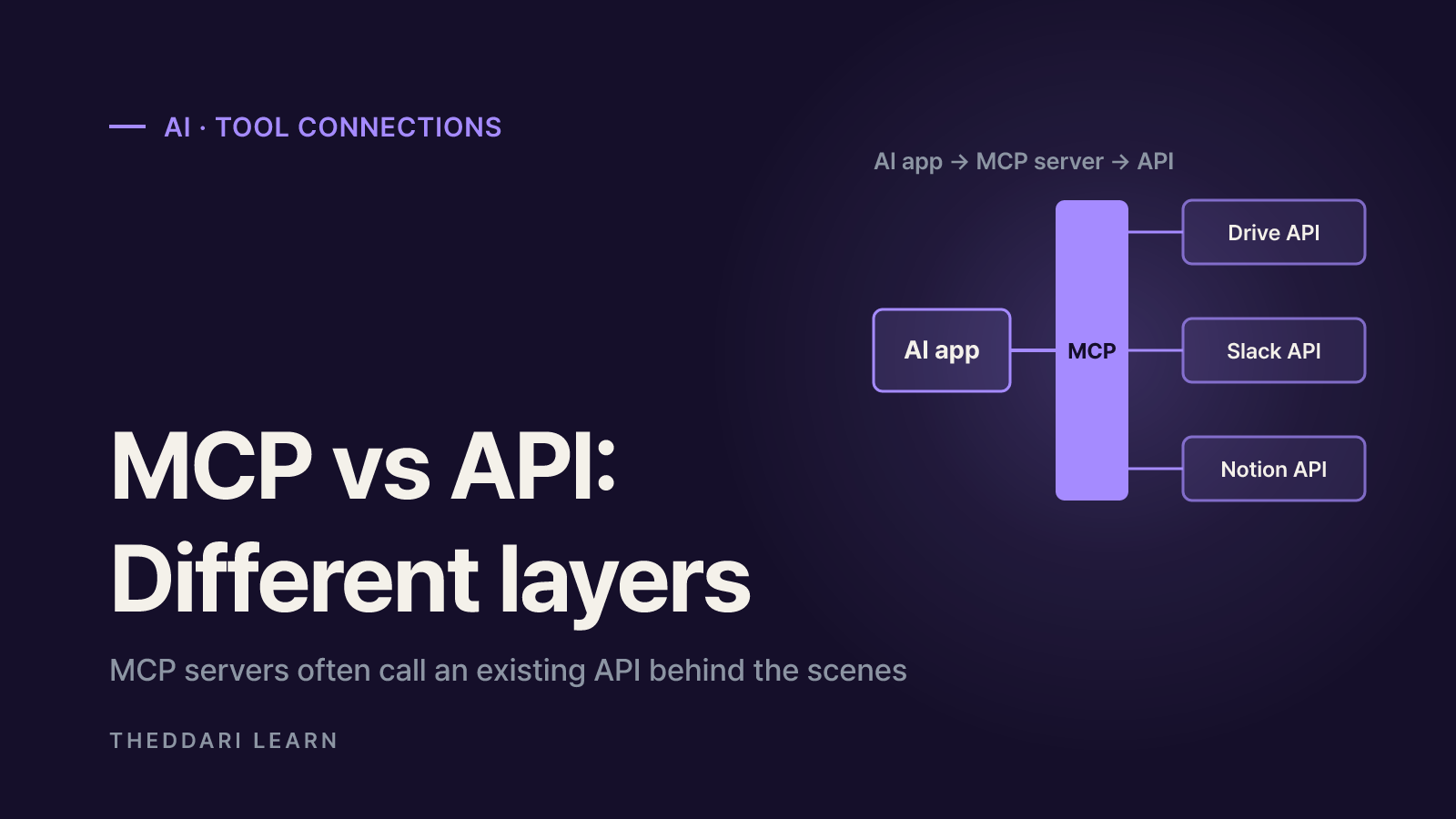
The short answer to MCP vs API: an API is the set of rules one particular service publishes for how other programs can talk to it, while MCP (Model Context Protocol) is an open standard that lets AI apps such as Claude and ChatGPT plug into many services' tools and data in the same way. They are not rivals. They sit at different layers, and most MCP servers call an ordinary API behind the scenes. This guide is based on the official MCP documentation (protocol version 2026-07-28) and Anthropic and OpenAI help pages, all checked in November 2026.
What an API actually is
An API (application programming interface) is a contract between programs. A weather API might say: send a city name to this address and you get the current temperature back. A calendar API might say: send a date and a title and it creates an event. The address, the inputs, the authentication method and the shape of the response are all defined by that one service.
The catch is that every service writes its own contract. Google Drive, Slack and Notion each have different endpoints, sign-in flows and error formats. If an AI app wants to use them directly, a developer has to write a tool definition and integration code for each one, explaining to the model when to call it and with what arguments. Multiply a handful of AI apps by a handful of services and the number of one-off integrations grows quickly.
Why direct API integrations are hard for AI apps
- Someone has to read each service's docs and match its request format.
- The app must store and refresh every API key or OAuth token itself.
- When a service changes its API, every app that integrated it has to be updated.
- The plain-language description that tells the model when to use a tool has to be rewritten in every app.
What MCP is, and how it is structured
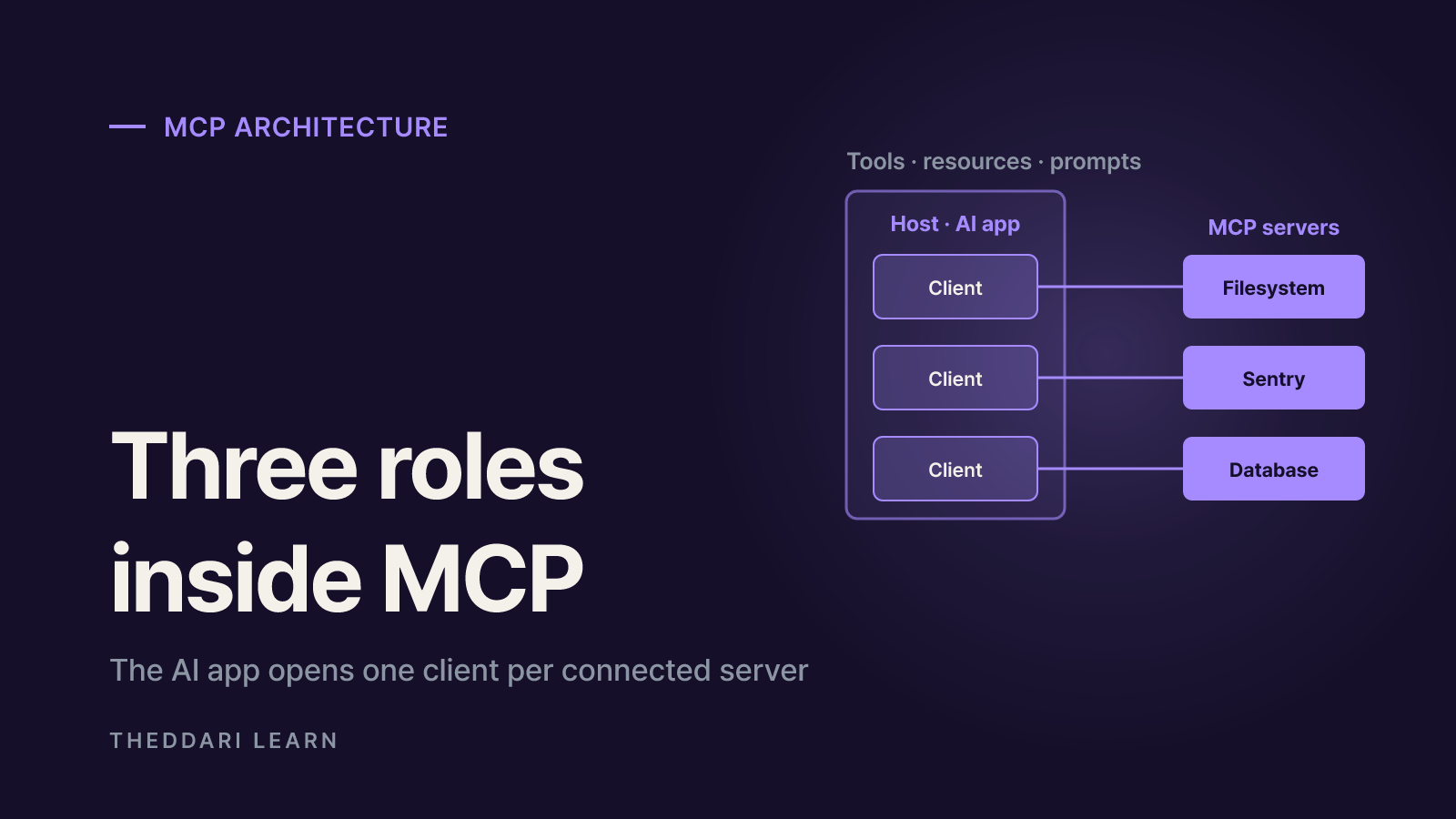
The official MCP introduction calls MCP an open-source standard for connecting AI applications to external systems and compares it to a USB-C port: one connector shape instead of a drawer full of cables. Anthropic created it, but the same page lists Claude, ChatGPT, Visual Studio Code and Cursor among the many clients that support it. The pitch is build a server once, use it from every compatible app.
According to the MCP architecture overview, there are three participants:
MCP host
- What it does
- The AI app you use; it creates and manages MCP clients
- Example
- Claude Desktop, Claude Code, VS Code
MCP client
- What it does
- Keeps a dedicated connection to one MCP server inside the host
- Example
- One client per connected server
MCP server
- What it does
- A program that exposes tools and data in MCP format
- Example
- Filesystem server, Sentry server
Servers offer three core building blocks. Tools are functions the AI can run, such as file operations, API calls or database queries. Resources are data the AI can read for context, like file contents or database records. Prompts are reusable instruction templates. The app first asks for tools/list to learn each tool's name, description and input schema, then sends tools/call when the model decides to use one. Every message uses JSON-RPC 2.0.
Local vs remote servers
Local servers run on your own machine and talk over standard input/output (stdio). Remote servers run on the internet and use the Streamable HTTP transport, which supports normal HTTP authentication such as bearer tokens, API keys and custom headers; the spec recommends OAuth for obtaining tokens. Since the 2026-07-28 version the protocol is stateless: each request carries the protocol version and capabilities, and servers describe themselves through a server/discover request.
MCP vs API: side-by-side comparison
What it is
- API
- One service's request and response rules
- MCP
- A shared protocol between AI apps and tool servers
Who adapts
- API
- Each integrator adapts to each service
- MCP
- The server is built once; any compatible app can use it
Discovering features
- API
- A developer reads docs and writes code
- MCP
- The app fetches tool names, descriptions and schemas via tools/list
Main consumer
- API
- Developers and programs
- MCP
- AI apps (the model) and their users
Format
- API
- Varies: REST, GraphQL and others
- MCP
- JSON-RPC 2.0 over stdio or Streamable HTTP
Auth
- API
- Per-service API keys or OAuth
- MCP
- OAuth recommended for remote servers; fixed keys possible
Relationship
- API
- Where the real functionality lives
- MCP
- Often a translation layer sitting on top of an API
So the useful mental model is not that MCP replaces APIs. A GitHub MCP server, for example, still calls the GitHub API internally. What changes is the AI app's side: it no longer needs to know GitHub's API at all, only the tool names, descriptions and input formats the server advertises. The MCP docs themselves list API calls as an example of a tool and API responses as an example of a resource.
Is MCP the same as function calling?
Not quite. Function calling (tool use) is the model's ability to decide 'call this function with these arguments.' MCP is how the list of functions and their execution get supplied by an external server in a standard format. The model picks tools the same way either way; what differs is who defines the tools and where they run. The architecture page also notes that MCP covers only the exchange of context and does not dictate how an app uses its language model.
How to connect an MCP server to Claude or ChatGPT
As of November 2026, both products let you register a remote MCP server by URL. Menu names and plan rules move around often, so check the linked help pages right before you connect.
Per the Claude Help Center, custom connectors using remote MCP work on Free, Pro, Max, Ultra, Team and Enterprise plans, with Free limited to one. On Pro or Max, go to Customize > Connectors, choose Add custom connector, enter a name and the server URL, then pick how people sign in. On Team or Enterprise, an Owner adds the connector in Organization settings first and each member then connects individually. Claude reaches your server from Anthropic's cloud, not from your laptop, so the server must be reachable on the public internet. You can toggle connectors per conversation from the + menu.
Per OpenAI's developer docs, open Plugins in ChatGPT on the web, select the plus button and choose Add custom MCP server. Enter the server URL, choose authentication (OAuth, no authentication, or mixed), acknowledge the risk warning and select Create as a plugin. Supported transports are SSE and streaming HTTP. After installing, type @ in the prompt box to pick it. Workspace permissions and security restrictions such as Lockdown apply, so a work account may not show the option at all.
Local servers are a separate path. Claude Desktop can launch local servers listed in claude_desktop_config.json using your own network, but Claude's help center notes these are not available in Cowork or on claude.ai.
- 1
Check who runs the server
Prefer servers built and hosted by the service itself or an organization you already trust.
- 2
Read the permission screen
During OAuth, compare the requested scopes with what you actually need and deny anything excessive.
- 3
Trim the tool list
Switch off write or delete tools you do not plan to use.
- 4
Inspect the first calls
Expand a few tool calls to see the exact inputs and outputs before relying on the connection.
Permissions and security risks to check first
MCP makes connecting easy, which also widens what an AI can do inside your accounts. Claude's help center warns that custom connectors can reach services Anthropic has not verified and can access and potentially modify data based on your permissions. OpenAI's docs warn that an untrusted server may steal information or trick ChatGPT into changing or deleting data.
- Prompt injection: a malicious server can hide instructions in tool output to steer the model. Both companies say to connect only servers you trust.
- Write approvals: ChatGPT asks for confirmation on write actions by default and treats any tool without
readOnlyHintas a write. Choosing to remember an approval applies for the rest of that conversation. - Unattended calls: Claude's Research mode can invoke connector tools without further approval, so Anthropic suggests disabling write tools when using it.
- Shared credentials: if a Team or Enterprise connector uses a fixed API key, everyone who uses it gets that key's access.
- Changing tools: server developers can change tool behavior without notice; investigate anything that suddenly works differently.
- Local servers: the MCP security best practices note that local servers run with the client's privileges and can lead to arbitrary code execution or data exfiltration. Read the full install command and skip packages of unclear origin.
You can revoke access later. In Claude, disconnect the connector in settings or remove the app's access from the connected service's security page (for example, your Google account). In ChatGPT, each app has a details page where you can switch individual tools off.
When to use an API and when to use MCP
If you are not a developer, MCP connectors cover most needs: when a service already offers an official MCP server, a URL and a sign-in are enough to use it inside a Claude or ChatGPT chat. There are still cases where going straight to the API is the better choice.
Find and summarize Notion or Drive files mid-chat
- Better fit
- MCP connector
- Why
- No code, and you can toggle it per conversation
Run the same job in bulk on a schedule
- Better fit
- Direct API call
- Why
- No model judgment needed; cost and speed are predictable
Share one internal tool across several AI apps
- Better fit
- Build an MCP server
- Why
- Build once and use it from every compatible app
High-stakes actions such as payments
- Better fit
- API plus human approval
- Why
- Keeps a fixed path that does not depend on the model
To follow which AI tools people are talking about, Theddari's AI Telegram trends page groups frequently mentioned topics from AI channels.

For AI topics that bloggers are covering, see the blog trends dashboard.
Bottom line: an API is a service's own order form, and MCP is the common plug that lets AI apps fill out many order forms the same way. Connecting is now a few clicks, but deciding which server gets which permissions is still your job. Check that the server is official, that write access is truly needed, and that approval prompts stay on, and you avoid the most common mistakes.