Contents8 sections
- How Higgsfield AI works: one subscription, many models, paid in credits
- Higgsfield pricing by plan (as of October 2026)
- How Higgsfield credits are spent
- How to use Higgsfield: sign-up to first video
- Commercial use, likeness and training: read the terms
- Refunds, renewals and cancellation
- Frequently asked questions
- Sources and references
Higgsfield AI is a subscription platform for generating AI video and images, and using it well mostly comes down to understanding credits. Each plan gives you a monthly credit balance, and every generation spends credits based on the model, the clip length and the resolution. The same five-second idea can cost several times more at 4K than at 720p. This guide covers sign-up, plan prices, credit costs, refunds and the commercial-use and likeness terms, based on Higgsfield's official blog, help center and Terms of Use as checked in October 2026. Prices are in US dollars and change often, so confirm them on the official pricing page before you subscribe.
How Higgsfield AI works: one subscription, many models, paid in credits
Higgsfield is an aggregator: you pick from third-party and in-house models such as Seedance, Kling, Google Veo, Nano Banana and FLUX from a single interface. According to the credits help article, credits are deducted for images, videos, re-rolls and upscaling, and the exact cost appears on the Generate button before you confirm. Browsing the platform is free. That button is the single most useful habit to build: check it every time you change a model, duration or resolution.
Plans are split into individual tiers (Free, Starter, Plus, Ultra) and business tiers (Team, Scale, Enterprise). An account can hold only one active subscription; if you need more, you upgrade or buy Credit Packs. Higher tiers unlock more models, more monthly credits and more jobs running in parallel. Some plans also include Unlimited access to selected models, but that applies only on higgsfield.ai with the Unlimited toggle switched on. Anything generated through MCP, the CLI, Canvas, Supercomputer or other automated tools always deducts credits.
The Higgsfield API is billed from a separate dollar balance. Subscription credits cannot pay for API calls, so developers should budget for the two independently.
Higgsfield pricing by plan (as of October 2026)
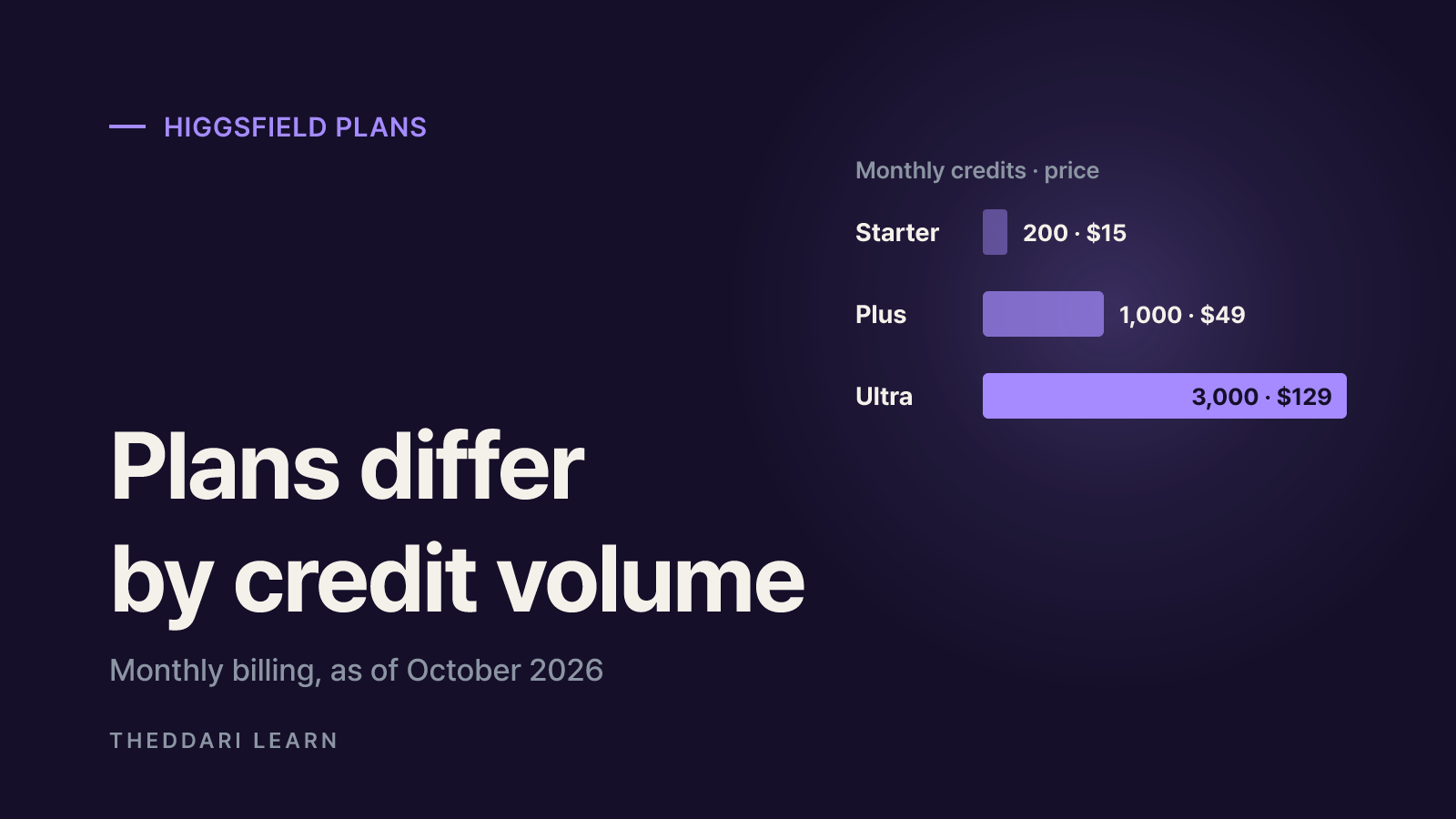
The table below uses monthly prices from Higgsfield's pricing explainer, which states the figures were verified on its pricing page in October 2026. Annual billing lowers the monthly equivalent and adds more 7-day Unlimited models; check the pricing page for the exact annual totals and any local taxes.
Free
- Monthly price
- $0
- Credits per month
- 0 (limited models)
- Video jobs at once
- 1
- Commercial use (pricing table)
- No
Starter
- Monthly price
- $15
- Credits per month
- 200
- Video jobs at once
- 2
- Commercial use (pricing table)
- Yes
Plus
- Monthly price
- $49
- Credits per month
- 1,000
- Video jobs at once
- 6
- Commercial use (pricing table)
- Yes
Ultra
- Monthly price
- $129
- Credits per month
- 3,000
- Video jobs at once
- 8
- Commercial use (pricing table)
- Yes
Team
- Monthly price
- $79 per seat
- Credits per month
- 1,000 per seat
- Video jobs at once
- —
- Commercial use (pricing table)
- 2 to 9 members
Scale
- Monthly price
- $215 per seat
- Credits per month
- 2,500 per seat
- Video jobs at once
- —
- Commercial use (pricing table)
- 5 to 15 members
Starter opens only selected models. Seedance 2.5, Seedance 2.0, Veo, Kling 3.0 at 1080p, Start and End Frame control, Higgsfield Speak and the UGC builder require Plus or Ultra. Plus and Ultra both open every model, so the difference between them is mainly credits (1,000 versus 3,000) and concurrency. The plan comparison lists no credit discount on any individual plan, suggesting a given model and setting costs the same number of credits on every tier; what changes is the dollar price per credit implied by each bundle.
What Unlimited really covers
Unlimited is narrower than the word suggests. Starter gets two image models, Seedream 5.0 Lite and FLUX.2 Pro at 1K, free of credits for 365 days. Plus and Ultra get a 365-day set of image models including Seedream, FLUX.2 Pro, Nano Banana and GPT Image, plus a few models unlocked for only 7 days. When a 7-day window ends, those models charge credits again. Business plans skip the 365-day set and receive 7-day Unlimited windows instead. In short, Unlimited is a time-limited perk on specific models and resolutions, mostly images, not a license to generate unlimited video.
How Higgsfield credits are spent
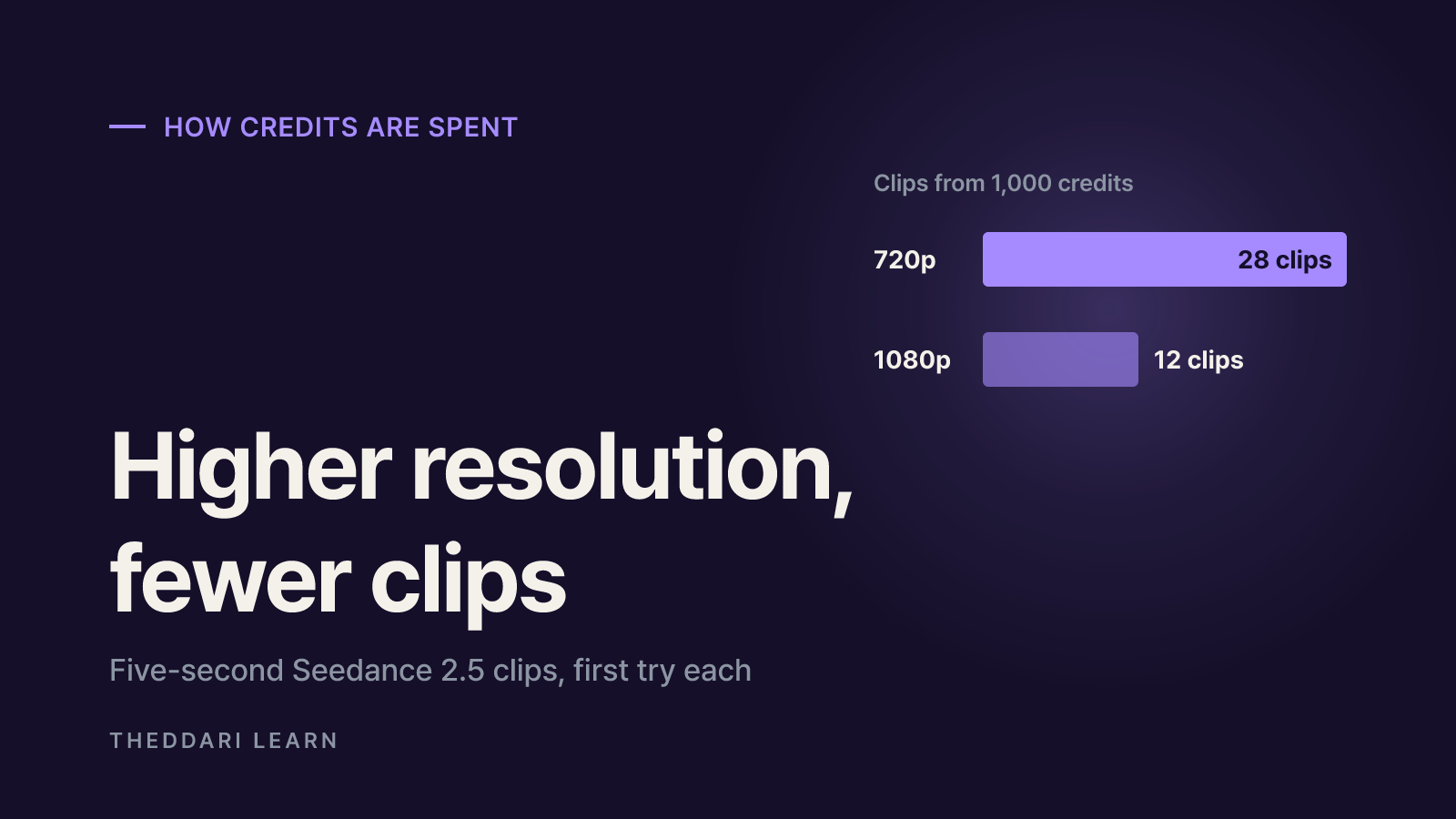
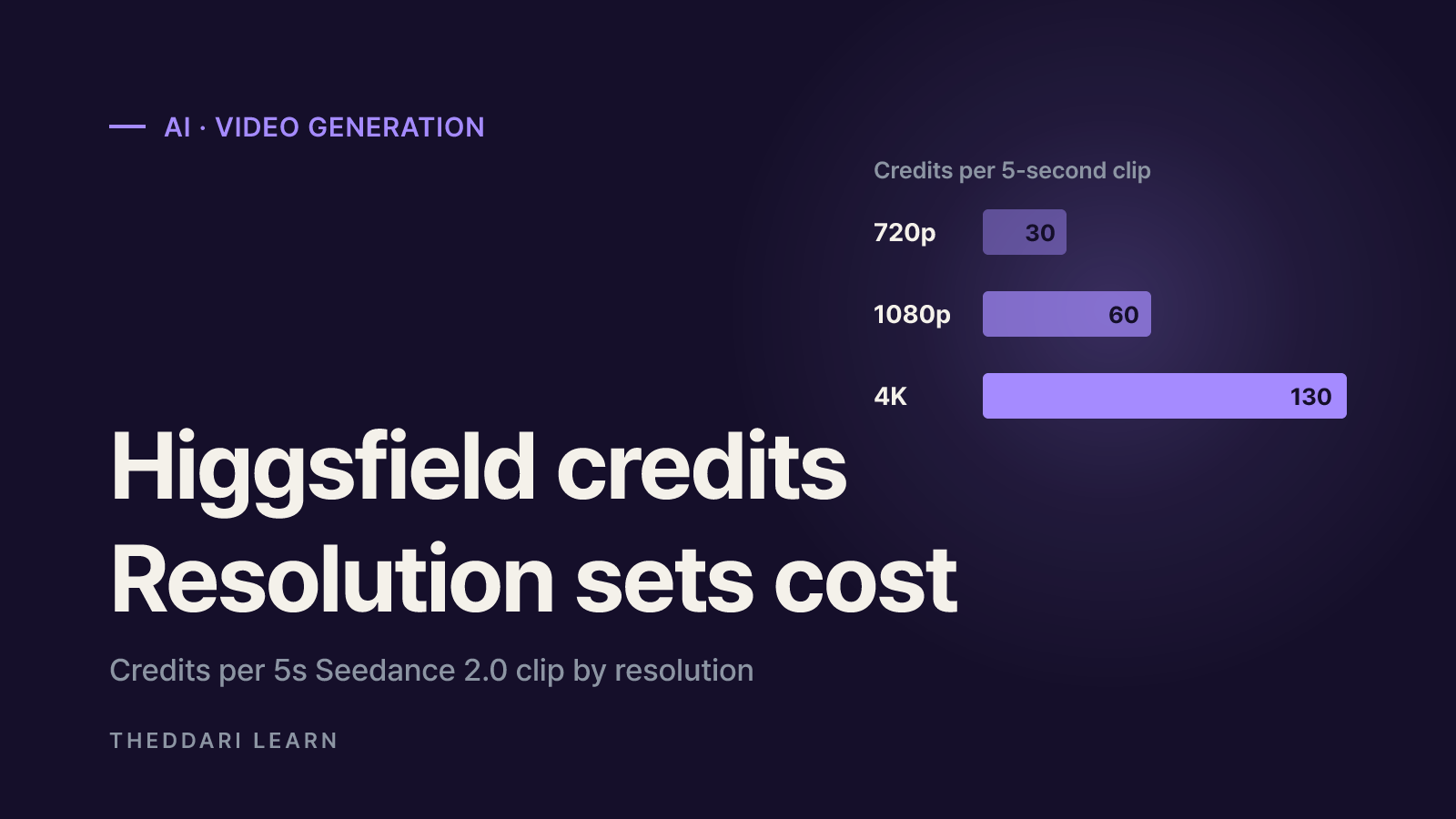
Video is where credits disappear. A 5-second Seedance 2.0 clip costs 30 credits at 720p, 60 at 1080p and 130 at 4K. On Seedance 2.5 at 720p, a 30-second clip costs 210 credits, six times the 35 credits of a 5-second clip. Images are cheap by comparison: FLUX.2 Pro costs 1 credit per image and Nano Banana Pro costs 2.
FLUX.2 Pro
- Setting
- 1 image
- Credits
- 1
Nano Banana Pro
- Setting
- 1 image
- Credits
- 2
Seedance 2.0
- Setting
- 5s, 720p
- Credits
- 30
Seedance 2.0
- Setting
- 5s, 1080p
- Credits
- 60
Seedance 2.0
- Setting
- 5s, 4K
- Credits
- 130
Seedance 2.5
- Setting
- 5s, 1080p
- Credits
- 80
Seedance 2.5
- Setting
- 30s, 720p
- Credits
- 210
Google Veo 3 with audio
- Setting
- 8s, 720p
- Credits
- about 58
Higgsfield calculates that the 1,000 credits on Plus cover 28 five-second Seedance 2.5 clips at 720p, or 12 at 1080p. That assumes every clip works on the first try. Because completed generations are charged even when you throw them away, two or three attempts per usable shot can cut your real output by half or more.
- Spending order: subscription credits go first, then other credits starting with whichever expires soonest (promo, Credit Pack, Auto-Refill).
- Failed generations: usually refunded automatically within minutes, but some models may not refund failures.
- No rollover: monthly plans refresh on your billing date and annual plans every 30 days; leftover subscription credits expire.
- Top-up expiry: Credit Pack and Auto-Refill credits expire 90 days after purchase. Auto-Refill is not available on Starter.
How to use Higgsfield: sign-up to first video
- 1
Create an account and check eligibility
Sign up at higgsfield.ai. Section 2.1 of the Terms of Use requires you to be at least 18, or the age of majority in your jurisdiction if higher. Account sharing is not allowed, so teams should look at the Team plan rather than one shared login.
- 2
Learn the interface on the Free tier
There is no trial period, but the Free tier lets you try a few image models. Use it to learn where models, duration and resolution settings live, and how the credit cost on the Generate button changes.
- 3
Choose a plan by the models you need
Check the pricing page comparison to see whether the models and resolutions you want are on Starter. If you need 1080p video from Seedance or Kling, or Start and End Frame control, you need Plus or above. Estimate monthly credits as clips per month multiplied by expected attempts per clip.
- 4
Draft cheap, then render high
Iterate on prompts and framing at 720p or with still images first. Once a direction works, re-run it at 1080p or 4K. This keeps expensive renders for shots you already know you want.
- 5
Audit your usage
Open Manage Account, then Usage, to see every generation with its model, credits deducted and any refunds. Use it to spot which models consume most of your balance before the next billing cycle.
New AI video models launch and get repriced quickly. If you want to see which models and tools are being discussed right now, theddari's AI Telegram trends page collects that chatter in one place. Treat it as a pointer only, and then confirm on Higgsfield's pricing page whether a model is included in your plan and what it costs.
Commercial use, likeness and training: read the terms
Section 4.4 of the Terms of Use says Higgsfield does not claim ownership of your inputs or outputs and does not restrict commercial use of outputs. The ownership help article lists ads, brand social posts, client work and YouTube monetization as examples. However, the pricing table marks the Free plan as not for commercial use, and free outputs may carry a watermark, so for client or paid work it is safer to assume a paid plan.
- Model training: your content, inputs and outputs may be used to train Higgsfield's models. Deleting content or your account stops future use but cannot remove data from models already trained. Only Enterprise agreements exclude customer content from training.
- Likeness and voice: you must hold consents and releases for any face, name or voice you upload, including your own. Depicting people without permission or legal justification is prohibited.
- Not exclusive: other users may receive similar or identical outputs.
- AI disclosure: where the law requires it, you must disclose AI-generated content and must not strip provenance markings such as C2PA metadata.
- No training other models: you may not use outputs to train or fine-tune other AI models.
- Sensitive data: do not put full names, contact details, account numbers or health information into prompts.
Legal indemnification against third-party IP claims is available only on Enterprise. If you produce client ads on an individual plan, verify the rights to reference images, logos and music yourself and get written consent from anyone who appears. Disputes are generally subject to binding arbitration with a class action waiver unless you opt out within 30 days, as Section 18 explains.
Refunds, renewals and cancellation
Per the plans help article, refunds are available within 7 days of your initial purchase, or as your local law allows, only if no credits have been used, and a service fee of up to 6% may apply. Renewals are non-refundable, and subscriptions renew automatically at the then-current price. If you only want one month, note the renewal date right after paying. Upgrades take effect immediately with a prorated charge.
After cancellation, subscription credits last until the end of the paid period. Pack, Auto-Refill and promo credits stay on the account but work only on models available without a subscription, and they still expire; you cannot buy new packs without a subscription. Rights to outputs you generated and exported survive cancellation and account deletion. The terms also allow Higgsfield to move content from accounts with 30 days of no login, generation or subscription into cold storage, so download anything important.
If you are comparing AI video tools and want to read what other creators are saying, theddari's blog trends page surfaces widely discussed posts. Reviews often quote older prices, so cross-check any number with Higgsfield's own pages.
 theddari.comTrendsBlog PostsSummarized Naver blog posts
Before paying, three checks prevent most surprises. Confirm on the pricing page that the models and resolutions you need are in your plan. Estimate credits as clips multiplied by attempts, remembering that unused subscription credits do not roll over. Finally, decide whether you accept the training clause and can document consent for every real person, logo or voice you use.