Contents8 sections
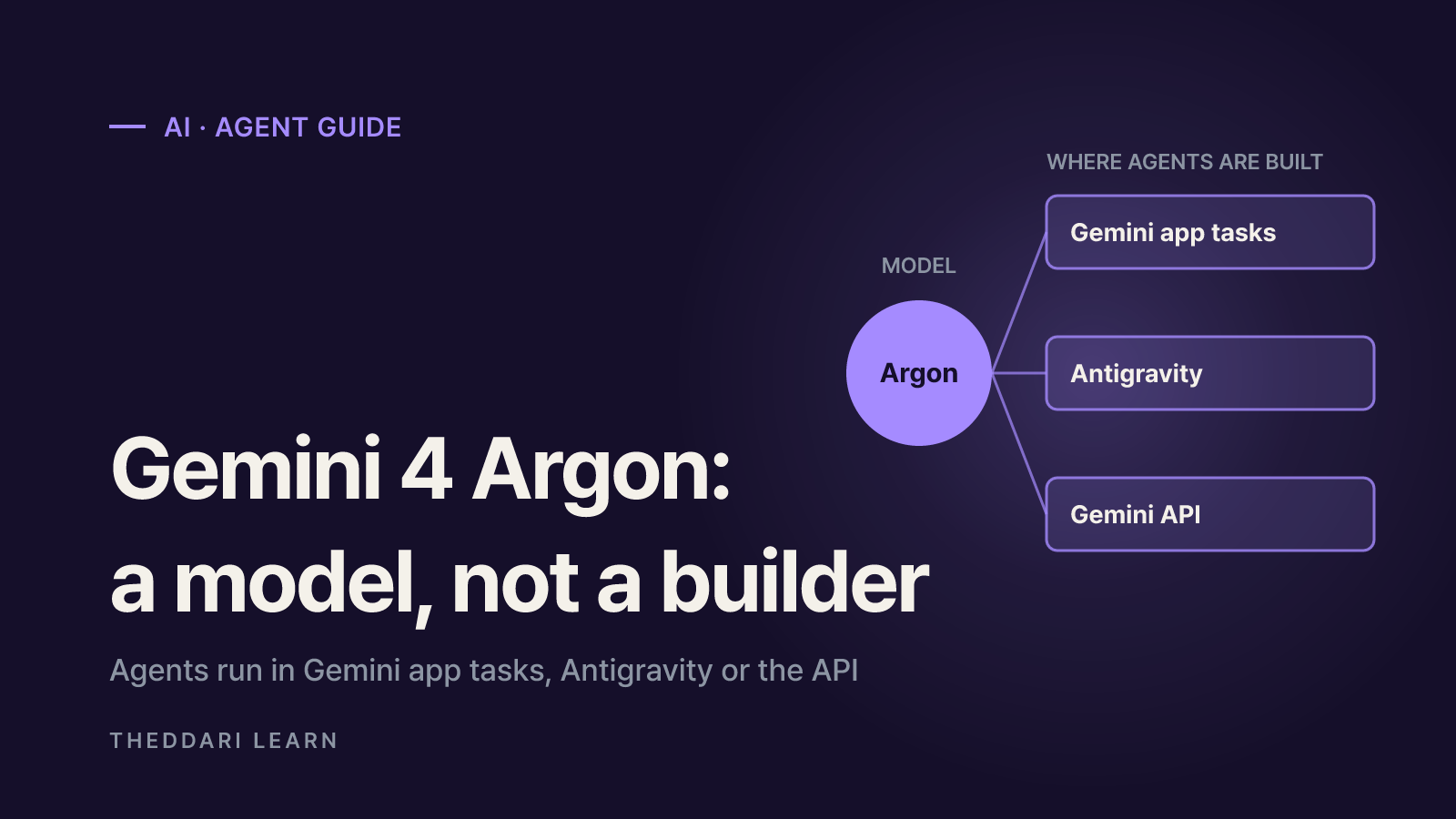
- Gemini 4 Argon is a model, not an agent builder
- Three ways to build a Google AI agent with Argon
- How to set up an agent with Gemini task mode
- What to check first: region, limits and cost
- Permission and data risks: what needs approval and what does not
- Summary: a first-run checklist
- Frequently asked questions
- Sources and references
Yes, you can build an AI agent with Gemini 4 Argon, but Argon itself is not an agent builder. It is the frontier model Google announced on September 30, 2026 and opened to developers, businesses and paying subscribers on October 13. The "AI employee" demos circulating online combine Argon with one of three products: task mode in the Gemini app, the Google Antigravity development environment, or the Gemini API. This guide is based on Google's official blog posts and help center pages as of November 6, 2026. It covers which path fits which user, who is eligible, what it costs and where the permission risks are. Treat video walkthroughs as a starting point and check the conditions below against your own account.
Gemini 4 Argon is a model, not an agent builder
In its launch post, Google positions Argon for long, multi-step work in coding, finance, legal, cybersecurity and science. At the September announcement it was limited to cyber defenders in the Fairwind Program; the October 13 rollout extended it to the paid API, Gemini for business, Antigravity and the Gemini app. The model ID is gemini-4-argon, and through the API it has a unified limit of 1,048,576 tokens shared between input and output.
An agent is software that takes a goal, plans steps and calls tools until the job is done. The model supplies the reasoning; the surrounding product supplies the connections, triggers and permissions. So the practical question is not whether Argon can be an agent but which product you run it in. According to the Google Cloud model page, Argon supports function calling, code execution, Google Search grounding, URL context and computer use. Tuning and RAG Engine are listed as not supported, which matters if you planned to fine-tune it on your own data.
Google says it trained Argon to respect system boundaries, report negative findings honestly and pause for human confirmation before irreversible steps. That is a model tendency, not a guarantee; the actual approval flow depends on the product and settings you use.
Three ways to build a Google AI agent with Argon
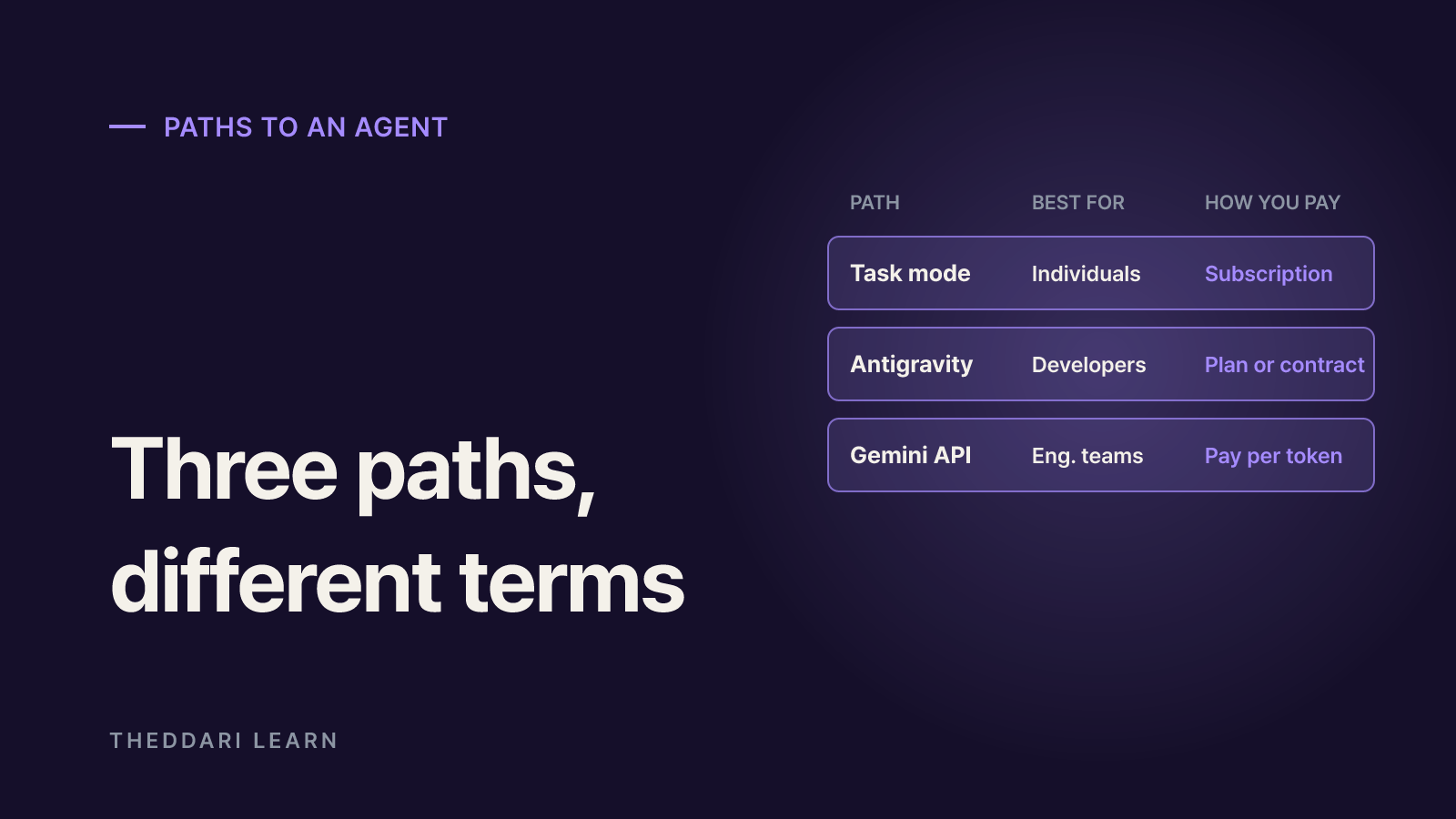
The same model behaves differently depending on where you use it. The table below reflects the launch terms Google published on October 13, 2026.
Gemini app task mode
- Best for
- Individuals
- What the agent does
- Delegated work across Gmail, Calendar, Drive and the browser
- Requirements
- Google AI Pro or Ultra, personal account, 18+
- How you pay
- Subscription plus compute-based limits
Google Antigravity
- Best for
- Developers and power users
- What the agent does
- Agentic coding and file work in the desktop app and CLI
- Requirements
- AI Pro or Ultra, or eligible Gemini Enterprise
- How you pay
- Subscription or enterprise contract
Gemini API / Gemini platform
- Best for
- Engineering teams
- What the agent does
- Custom agents using function calling and computer use
- Requirements
- Paid AI Studio tier or Google Cloud billing
- How you pay
- Pay per token
Gemini app task mode
Google's Gemini app announcement describes a toggle from chat to tasks in the main window. In task mode, Gemini keeps working when you are away from your computer and can use more than 40 connected apps, including Instacart, OpenTable, Adobe and Shopify. This is the closest thing to a no-code agent for most people. The help center notes that the feature was tested in beta as Spark from May and renamed Task.
Google Antigravity
Antigravity is Google's agent-first development environment. The Antigravity blog says Argon is rolling out in the desktop app and CLI for Google AI Pro and Ultra subscribers and eligible Gemini Enterprise subscriptions. Google's main launch post mentions only Ultra subscribers for Antigravity, so Pro users should update the app and confirm Argon appears in the model picker. Plugins, skills and MCP integrations connect the agent to your own data and workflows.
Gemini API and Gemini platform
If you want to code your own agent, call Argon through the paid tier in AI Studio or through Gemini platform on Google Cloud. Function calling links it to internal systems, and the computer use tool lets it operate a screen. For companies, the Google Cloud blog also highlights the Gemini agent inside Gemini Enterprise. You get more design freedom than in the consumer app, but you are responsible for building approvals, logging and permission limits yourself.
How to set up an agent with Gemini task mode
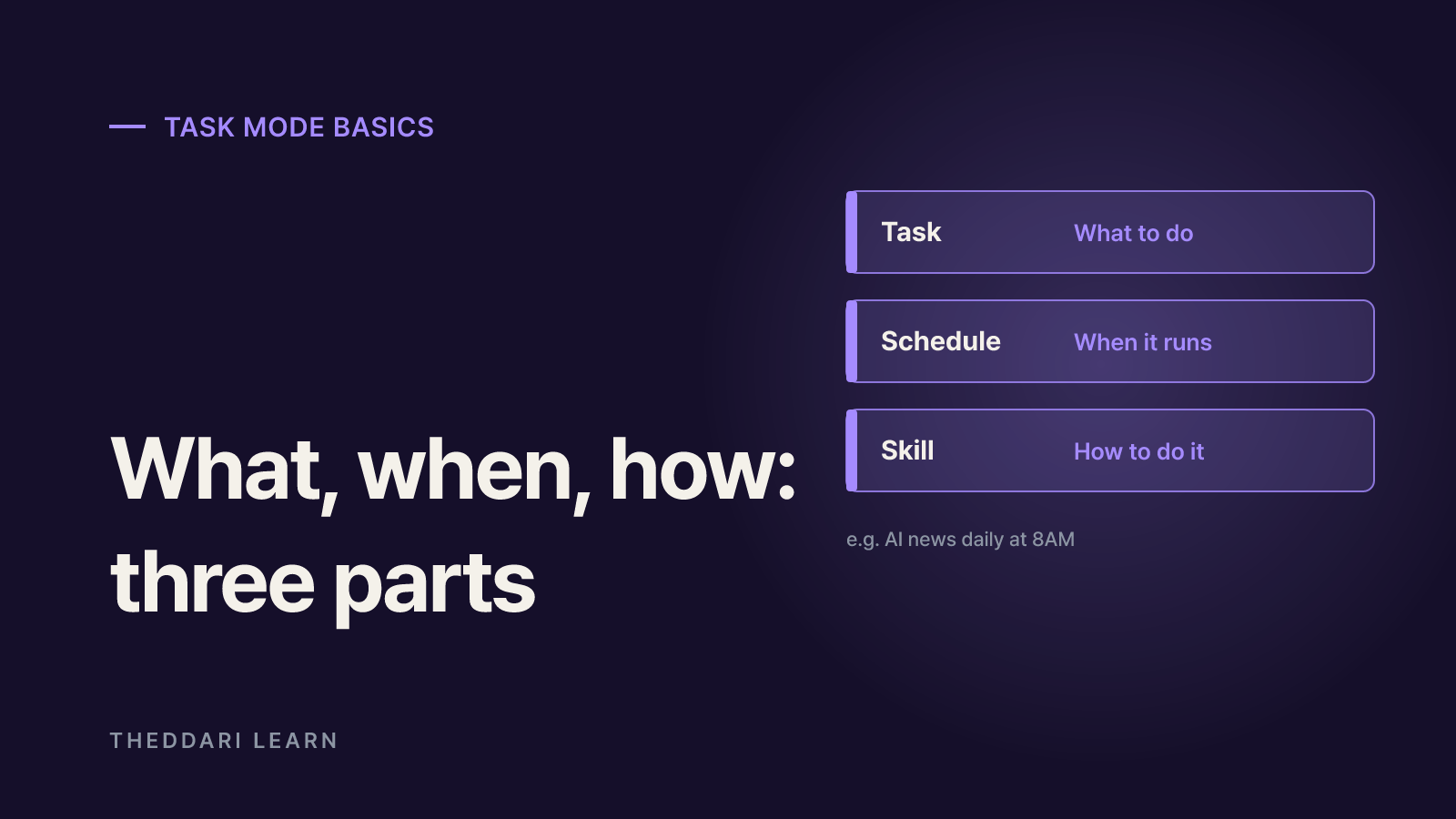
Google's tasks help page breaks the feature into three building blocks: a task is what you want done, a schedule is when it runs and a skill is how to do it. In "Every day at 8AM, give me an update on AI news," the briefing is the task, 8AM is the schedule and your formatting instructions can live in a skill.
- 1
Meet the requirements
Sign in with a personal Google Account, be 18 or older and subscribe to Google AI Pro or Ultra. Turn on Keep Activity and opt in to Personal Intelligence. Tasks work in the Gemini mobile app, the Gemini app on Mac and gemini.google.com.
- 2
Create a task
Select Task below the prompt box and describe the goal. Type @ to attach an existing skill, upload files or add Drive and Notebook content, and choose the model and thinking level from the model menu. If you are new, type "get started" or "interview me" and Gemini will help set up skills and tasks conversationally.
- 3
Add a schedule
Schedules can be time-based (once, hourly, daily, weekly, monthly or yearly), triggered by Gmail messages that match a filter, or driven by topic monitors for news, finance, sports and local events. You can also create one on the Scheduled page and use Run now to test it.
- 4
Supervise the run
Open the progress chip in the task thread to see completed, current and planned steps and the files Gemini read or changed. Gemini hands control to you at sign-in pages and similar steps, and you can stop it or take over the browser at any time.
Gemini can generate files such as PDF, DOCX, XLSX and PPTX, and it can browse with your local Chrome or a remote browser in the cloud. The local browser has access to every site you are signed in to, and your device and Chrome must stay awake; if they do not, Gemini may switch to the remote browser. The remote browser saves cookies for future sessions, so delete remote browser data in settings after sensitive work.
What to check first: region, limits and cost
Region and account type
Tasks are available wherever Gemini Apps are supported except the European Economic Area, Nigeria, Switzerland and the United Kingdom. Work and school accounts are excluded for now, so business use needs an enterprise path. If you cancel or downgrade your plan, you lose access to tasks; in-progress tasks finish and schedules pause rather than being deleted.
Usage limits and schedule reliability
The schedules help page caps you at 15 running tasks and 50 active schedules. A schedule will not run if 15 tasks are already active or if you have hit your compute-based usage limit. Run times are approximate and can slip during busy periods. Google itself says monitors are not ideal for fast-moving data or time-critical jobs such as alerting you the moment tickets go on sale. Anything that depends on live prices may be stale by the time it reaches you.
API pricing
Introductory API pricing is $2 per million input tokens and $10 per million output tokens through November 30, 2026, with cached input tokens 95% off. After that, the standard rate of $4 for input and $20 for output applies, so costs double. Agents loop through many steps and count thinking and function calls as output, so budget with the post-November rate and log token use per task while testing.
Permission and data risks: what needs approval and what does not
Google calls task handling experimental and says your supervision is the most important safeguard. Before relying on approval prompts, learn which actions skip them.
| Category | What the help center says |
|---|---|
| Always asks first | Sending communications, modifying or deleting data, purchases, financial transactions, filling out and submitting web forms, Sign in with Google |
| Pauses before sharing | Health information, financial details or government ID numbers going to a site or connected app |
| May run without approval | Bulk adds, updates and deletes of private items in Google Tasks |
| Hard to stop | Unintended actions from a schedule that runs while you are offline |
The biggest threat is indirect prompt injection: hidden instructions in a web page, email or document that trick the agent into leaking your mail or running a malicious command. The help center warns about this explicitly. Google reports that Argon cut attack success on the Gray Swan Indirect Prompt Injection benchmark to 0.7% across 15 adaptive attempts, which is low but not zero. Never paste passwords or card numbers into a task thread; take control of the browser and type them on the page instead.
Google's own advice is to avoid scheduling tasks that use information or perform actions you consider sensitive. Keep a human approval step for bank accounts, outgoing work email and edits to shared documents.
Launch-week coverage often blends features from different products. The theddari AI Telegram trends and blog trends pages help you see how the same update is being described across channels; confirm details against Google's original pages before you act.
 theddari.comTrendsBlog PostsSummarized Naver blog posts
Summary: a first-run checklist
- Pick the path: personal inbox and calendar work fits Gemini app tasks, code and file work fits Antigravity, and product integrations need the API.
- Check eligibility: plan tier, personal versus work account, your country, and the Keep Activity and Personal Intelligence settings.
- Start with low-risk jobs: summaries and drafts that are easy to undo. Use Run now before switching a schedule on.
- Narrow permissions: connect only the apps you need, and clear remote browser and remote code execution data after sensitive sessions.
- Track cost: if you use the API, recalculate with the rates that apply after November 30, 2026 and set a spending cap.
In short, Gemini 4 Argon upgrades the brain of an AI assistant, while task mode, Antigravity or the API decide what it can touch. None of them guarantees error-free behavior, so define the scope of each job and its approval points before you hand it over.