Contents7 sections
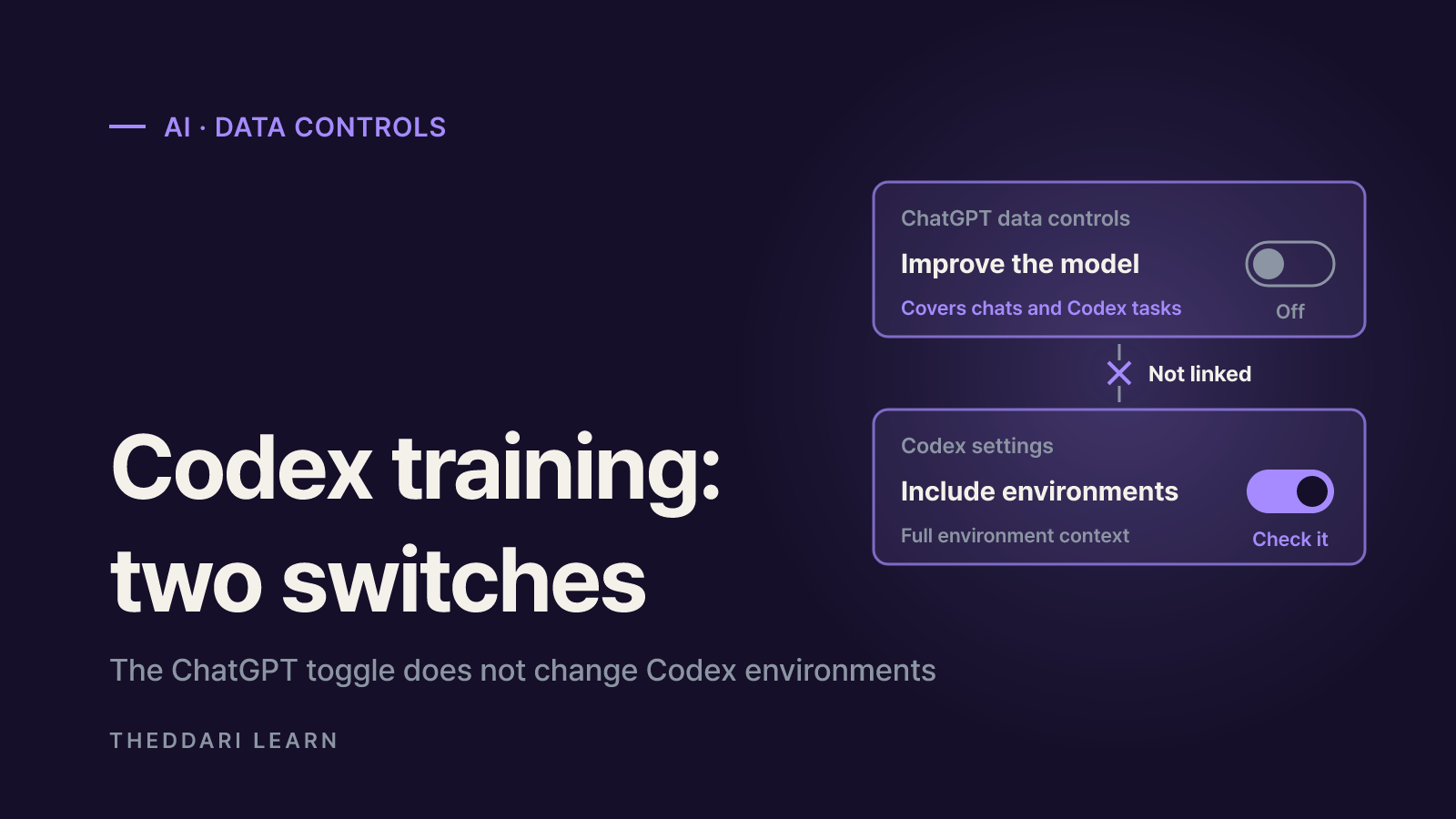
Short answer: if you use Codex through a personal ChatGPT account, your tasks can be used to train OpenAI models unless you opt out. A complete Codex training opt out takes two checks: turn off Improve the model for everyone under ChatGPT Settings, Data controls, and separately review the Include environments setting inside Codex. This guide is based on OpenAI's data controls help page and the Codex authentication docs, both checked on November 4, 2026. These are account-level settings, so they apply the same way regardless of your country.
The question resurfaced after a Hacker News post titled OpenAI seems to be silently re-enabling model training on Codex chats. Below, I separate what OpenAI documents from what users are reporting, then walk through which accounts are affected and how to lock things down.
What the re-enabled training reports actually say
The poster wrote that their company is cautious about leaking intellectual property, so the whole team had disabled data sharing in tools like Codex and Claude Code. They then noticed the Codex-related toggle was back on, and coworkers saw the same thing. The poster was explicit that they could not prove it and asked whether others had seen it. When I read the thread it had more than 400 points and over 100 comments.
Confirmed facts versus community claims
Confirmed
- Claim
- Personal plans have data sharing on by default
- Source
- OpenAI Help Center
Confirmed
- Claim
- The ChatGPT training toggle also covers Codex tasks
- Source
- OpenAI Help Center
Reported
- Claim
- Opted-out toggles silently turned back on
- Source
- Poster and some commenters
Counter-report
- Claim
- Toggle is still off
- Source
- Several commenters
Unknown
- Claim
- Cause: bug, policy change or user error
- Source
- Not addressed in docs I reviewed
One commenter said their history showed two granted opt-out requests, yet training was enabled again. Others replied that their setting was unchanged. None of the OpenAI pages I reviewed acknowledge or deny the reports. That makes it unwise to claim it affects everyone, and equally unwise to assume it affects no one. The practical move is to check your own toggle and write down the date.
Policy stories like this tend to move fast across AI-focused channels before any official statement lands. Tracking the AI conversation on Telegram is one way to spot a follow-up announcement early.
Which Codex accounts are used for training
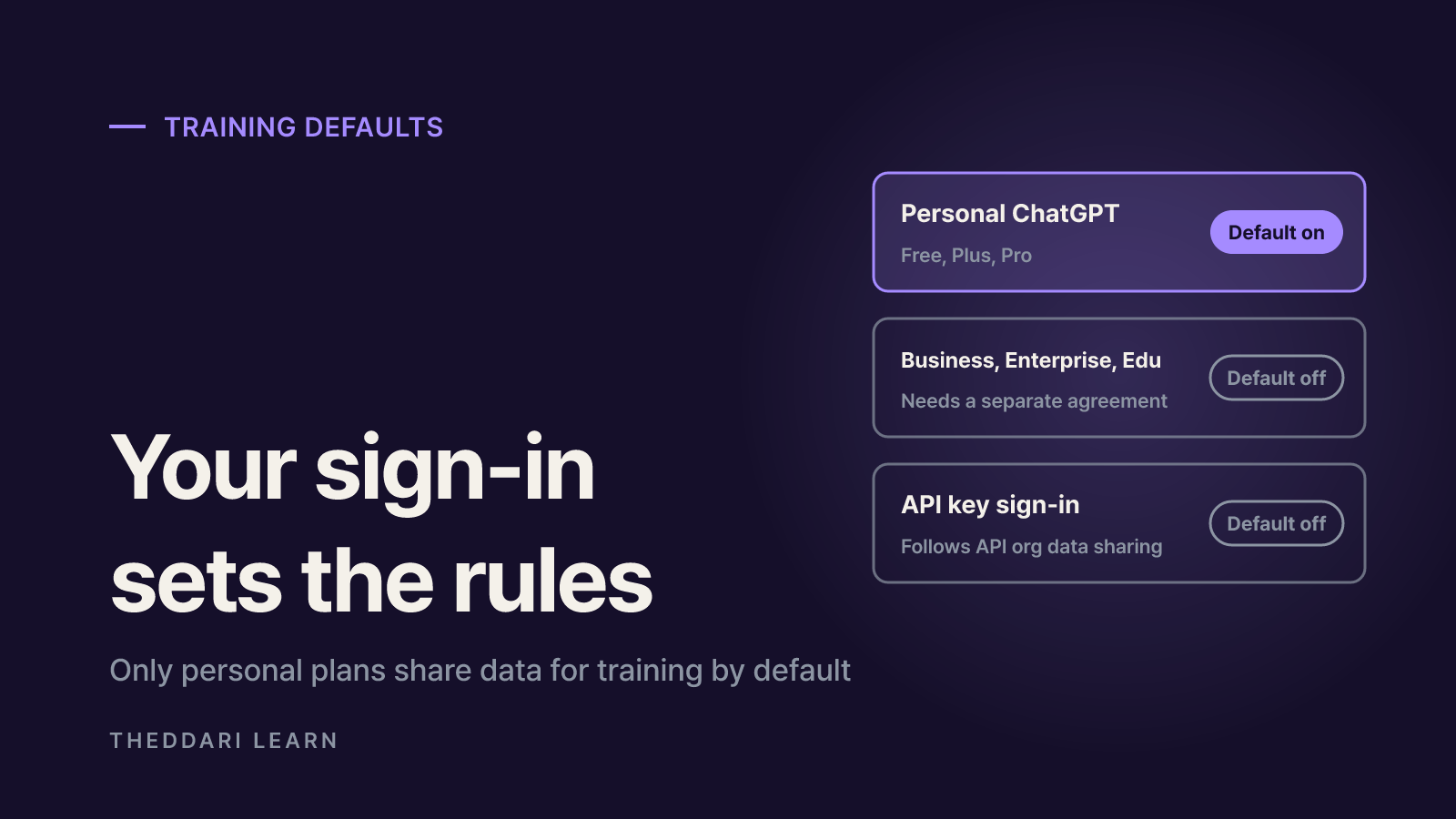
How you signed in decides which rules apply. According to the Codex authentication docs, signing in with ChatGPT means Codex follows your ChatGPT workspace permissions and retention settings, while signing in with an API key means it follows your API organization's retention and data-sharing settings. Codex cloud requires ChatGPT sign-in.
Personal ChatGPT (Free, Plus, Pro)
- Training by default
- Yes, eligible
- Where to change it
- Settings, Data controls, or the Privacy Portal
ChatGPT Business, Enterprise, Edu
- Training by default
- No
- Where to change it
- Only with a separate agreement; admin policies apply
API key
- Training by default
- No
- Where to change it
- API org owners can enable data sharing
Codex Include environments
- Training by default
- Check per account
- Where to change it
- Codex settings, separately
OpenAI's page on how your data is used to improve model performance confirms that business workspaces and the API are excluded by default. The risk most developers miss is mixing accounts: a work laptop signed in to a company workspace and a home machine signed in to a personal Plus account follow different rules, even for the same repository.
Computer Use screenshots are covered too
The Codex plan help page states that your ChatGPT training controls apply to content processed through Codex, including screenshots taken by Computer Use. If a password manager or internal document is visible while Computer Use runs, the toggle matters more than you might expect.
How to complete a Codex training opt out
- 1
Confirm how you are signed in
In Codex CLI, run
codex login statusto see the active authentication method. In the desktop app or IDE extension, open the profile menu to see the active account or API key status. - 2
Turn off the ChatGPT toggle
On the web, open your account menu, choose Settings, then Data controls, select Improve the model for everyone, switch it off and click Done. On iOS or Android, open the sidebar, tap your profile icon, choose Data controls and switch it off. When signed in, the choice applies across devices.
- 3
Or use the Privacy Portal
Choosing Do not train on my content in OpenAI's Privacy Portal works too. OpenAI says either option is enough for both ChatGPT conversations and Codex tasks.
- 4
Check Include environments in Codex
Codex has a separate Include environments setting that controls whether extra context from your Codex environments can be used for training. Neither the ChatGPT toggle nor the Privacy Portal changes it.
- 5
Log the date
Take a screenshot or note the date you verified each setting, so you have a baseline if you suspect it changed later.
Opting out does not delete anything. Per the data controls page, regular, archived and project chats stay where they are, and archiving a chat does not change whether it is eligible for training. To remove content, delete chats or the account separately.
What an opt-out does not cover
- Feedback ratings: on personal plans, a thumbs up or thumbs down can make the entire associated conversation eligible for training even after opting out. Read Codex feedback prompts before answering them.
- Trusted Access sessions: OpenAI says content from Daybreak Blue and similar Trusted Access sessions on personal accounts may be used to strengthen cyber-misuse safeguards even when the toggle is off. Your normal setting still applies elsewhere.
- Voice mode: ChatGPT voice has its own separate training control.
- Support chats: conversations with OpenAI Support may be used to improve services if the training toggle is on.
- Retention is not training: Temporary Chats are not used for training but may be kept for up to 30 days for safety. Not training on data and not storing it are different promises.
Several Hacker News commenters made the same point: blocking training is not the same as keeping data off the provider's servers. For genuinely sensitive code, treat the toggle as one control among several rather than a guarantee.
Extra steps for teams using Codex
- Inventory whether each developer signs in with a personal account, the company workspace or an API key. Managed environments can pin this with
forced_login_methodandforced_chatgpt_workspace_id. - For API-key workflows, have the API organization owner verify data-sharing settings directly.
- If personal accounts are allowed, schedule a recurring check of the Data controls page.
- Treat
~/.codex/auth.jsonlike a password, since it can hold access tokens in plaintext. Never commit it or paste it into tickets.
Developer blogs often pick up data-policy disputes before mainstream coverage does. Watching blog trends for the same topic can point you to an official clarification or follow-up reporting.
 theddari.comTrendsBlog PostsSummarized Naver blog posts
The checklist in one line: confirm your sign-in method, turn off Improve the model for everyone or use the Privacy Portal, review Include environments in Codex, be careful with feedback buttons, and log the date. Whether the re-enabled toggle reports reflect a bug or something else has not been officially explained, so repeat these checks if OpenAI publishes an update.