Contents7 sections
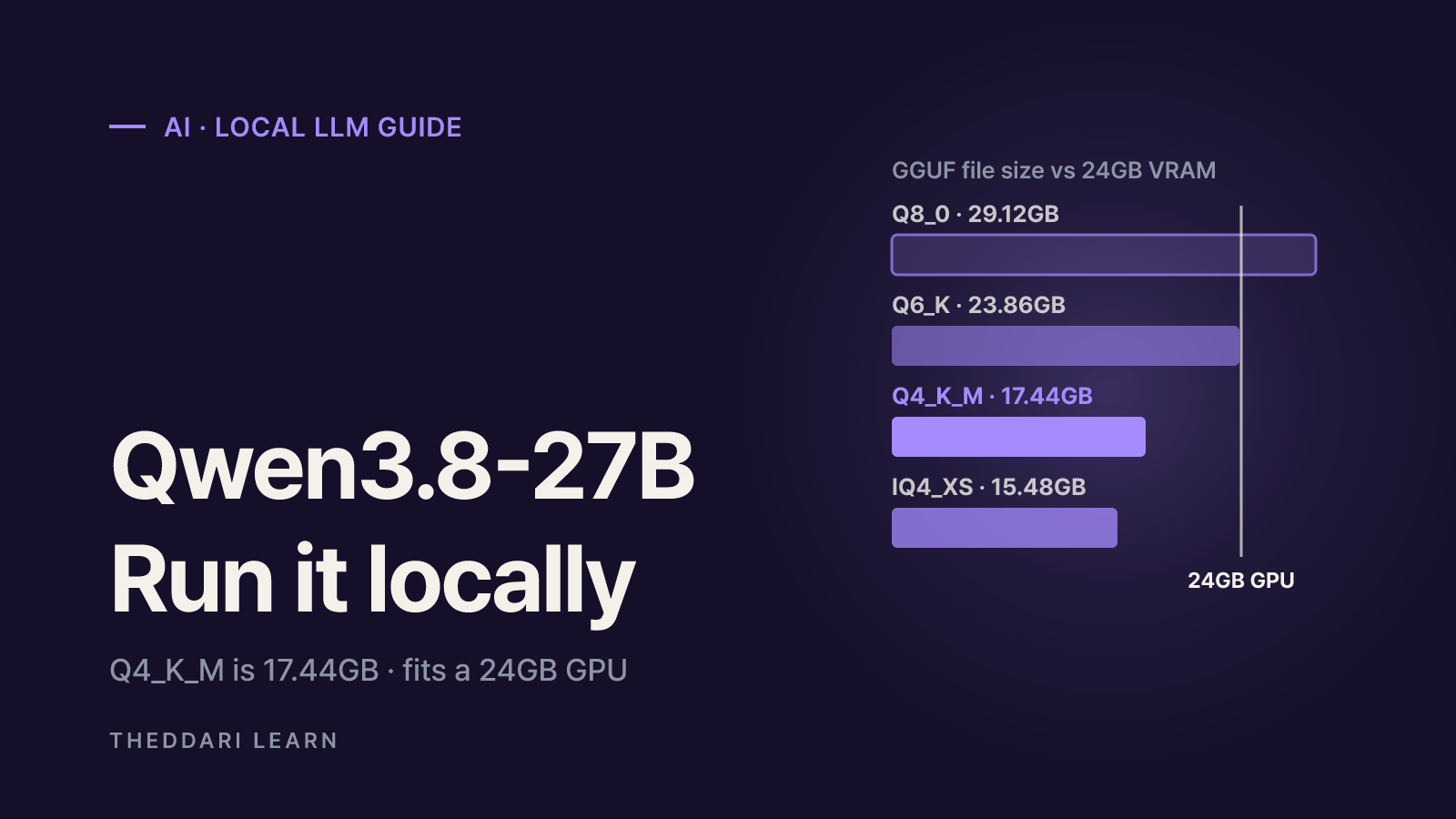
To run Qwen3.8-27B locally on a typical desktop or laptop, you will almost certainly use a GGUF quantized version with llama.cpp or an app built on it, rather than the original BF16 weights. As of October 2026, the popular 4-bit Q4_K_M file is roughly 17-18GB, which makes a single 24GB GPU or a Mac with 32GB or more of unified memory a comfortable starting point. A 16GB card can work, but only with a smaller quant and a shorter context window. This guide uses the official Qwen model card and measurements published in community GGUF repositories on Hugging Face. Sizes and speeds vary by uploader and test rig, so check the repo you actually download from.
What Qwen3.8-27B is and why its size matters
Qwen3.8-27B is a 27-billion-parameter dense model from Alibaba's Qwen team, released in August 2026 as part of the Qwen3.8 family. The model card describes it as a native vision-language model that understands images and video, licensed under Apache-2.0. Dense means every parameter is used for every token, unlike mixture-of-experts models that activate only a subset. In practice, the parameter count translates directly into memory and compute. Thinking mode is on by default, and you can disable it per request or adjust reasoning depth with reasoning_effort.
The detail that matters most for local use is the hybrid attention layout. Its 64 layers are arranged as 16 blocks of three Gated DeltaNet (linear attention) layers followed by one Gated Attention layer, so only 16 layers keep a conventional KV cache. That makes long contexts far cheaper in memory than on a comparable 27B model with full attention everywhere. The card lists a native context of 262,144 tokens, extendable to about one million with YaRN, but on consumer hardware memory will usually be the limit long before that.
Parameters
- Model card value
- 27B dense (HF shows 28B)
- What it means locally
- Around 50GB in BF16 before quantization
Layers
- Model card value
- 64, of which 16 full attention
- What it means locally
- Small KV cache, friendlier to long context
Native context
- Model card value
- 262,144 tokens
- What it means locally
- You use only what memory allows
Inputs
- Model card value
- Text, image, video
- What it means locally
- GGUF needs a separate mmproj file
License
- Model card value
- Apache-2.0
- What it means locally
- Commercial use allowed; read the full terms
Qwen3.8-27B GGUF quants compared
The official repository provides Transformers-format BF16 safetensors and recommends SGLang, vLLM or TokenSpeed for serving. There is no official GGUF; GGUF files are community quantizations, and when we checked in October 2026 the model tree listed 1,438 quantized derivatives. A widely used option is bartowski's GGUF repo, built with llama.cpp release b10896, which reports file size alongside perplexity, KL divergence and how often each quant picks the same top token as the BF16 reference.
Q8_0
- File size
- 29.12GB
- Same top token as BF16
- 98.7%
- Best for
- Near-original quality, needs 32GB-class memory
Q6_K
- File size
- 23.86GB
- Same top token as BF16
- 97.4%
- Best for
- Quality first; short context on 24GB
Q5_K_M
- File size
- 20.92GB
- Same top token as BF16
- 96.9%
- Best for
- Middle ground
Q4_K_M
- File size
- 17.44GB
- Same top token as BF16
- 95.0%
- Best for
- Uploader's default pick
IQ4_XS
- File size
- 15.48GB
- Same top token as BF16
- 94.1%
- Best for
- Squeezing onto 16GB cards
Q3_K_M
- File size
- 13.40GB
- Same top token as BF16
- 89.8%
- Best for
- Noticeable quality loss begins
Q2_K
- File size
- 10.82GB
- Same top token as BF16
- 83.5%
- Best for
- Experiments only
These figures come from 100 chunks of Wikipedia test text, so they show the shape of the trade-off rather than your exact experience with code, math or non-English chat. Loss stays modest down to 4 bits and then climbs quickly. Also note that the same label can have different sizes across repos: other uploaders list Q4_K_M at 15.4GiB or 17.77GB. The gap comes from GB versus GiB units, whether multi-token prediction (MTP) layers are bundled, and how each quantizer allocates precision across tensors.
K-quants versus I-quants
Names like Q4_K_M are K-quants; names starting with IQ, like IQ4_XS, are I-quants. Bartowski's advice is to pick a K-quant if you don't want to think about it, and to consider I-quants below 4 bits on NVIDIA (cuBLAS) or AMD (rocBLAS), where they give better quality per gigabyte. I-quants are slower on CPU, and on an RTX 3090 IQ4_XS was 9% smaller than Q4_K_M but about 23% slower. Choose one when you need the size, not the speed.
Hardware you need to run Qwen3.8-27B locally
Think of memory as model file + KV cache + runtime overhead. Bartowski suggests choosing a file 1-2GB smaller than your VRAM for full GPU speed, or 1-2GB smaller than VRAM plus system RAM if you prioritise quality and accept partial CPU offload, which slows generation considerably. According to the bowmanslayer repo, the f16 KV cache costs 64KiB per token: about 2GiB at 32K context and 8GiB at 128K. Quantizing the KV cache to 8-bit halves that.
24GB GPU (RTX 3090, 4090)
- Realistic choice
- Q4_K_M or Q5_K_M
- Watch out for
- Q6_K fits but leaves little context
16GB GPU
- Realistic choice
- IQ4_XS or a Q3 quant
- Watch out for
- Q4_K_M leaves almost no KV room
32GB+ GPU
- Realistic choice
- Q6_K to Q8_0
- Watch out for
- Q8_0 does not fit fully on 24GB
Mac, 32GB unified
- Realistic choice
- Q5_K_M or Q6_K
- Watch out for
- Subtract what macOS uses
Mac, 64GB unified
- Realistic choice
- Q8_0
- Watch out for
- MLX may be faster than llama.cpp
CPU only
- Realistic choice
- A Q4 quant with plenty of RAM
- Watch out for
- Works, but slow for chat
On one RTX 3090 (24GB, Vulkan, full offload), bowmanslayer used llama-fit-params to measure the largest context that fits: 32,512 tokens for Q6_K, 73,472 for Q5_K_M, 111,872 for Q4_K_M and 133,632 for IQ4_XS. Dropping from Q6_K to Q4_K_M costs a little quality and buys roughly 3.4x the context on the same card. Generation speed was 41.4 tokens per second for Q4_K_M and 32.3 for Q6_K. Treat these as one person's numbers on one machine; the author notes CUDA builds are typically faster.
If your goal is long documents or large codebases, staying on Q4_K_M and keeping KV cache headroom usually gives you more usable capability than stepping up to a bigger quant.
Running it with llama.cpp, step by step
- 1
Install a current llama.cpp
llama.cpp identifies Qwen3.8 as the
qwen35architecture. The bowmanslayer files need build b10502 or newer, and bartowski's were made with b10896. Older builds can fail with errors such astensor ... not found, so install a recent release or update through your package manager. - 2
Download one quant
Use
hf downloadwith an include pattern to fetch a single file, or letllama-server -hf <repo>:Q4_K_Mdownload and launch in one step. Make sure you have more free disk space than the file size. - 3
Set GPU layers and context
Use
-nglfor the number of layers on the GPU and-cfor context length. Start around 8K to 32K tokens, watch memory use, then raise it. - 4
Add vision or MTP only if useful
For images, load the repo's
mmprojfile with--mmproj. Speculative decoding with the built-in MTP layers is enabled with--spec-type draft-mtp; in one test it gave about +36% on CUDA, +3% on Vulkan and -11% on Apple Metal, so benchmark it on your backend. - 5
Apply the recommended sampling
The model card suggests temperature 1.0, top_p 0.95 and top_k 20 in thinking mode, and temperature 0.7, top_p 0.80 and presence_penalty 1.5 in non-thinking mode. Not every framework supports every parameter.
By default llama-server serves a web chat UI and an OpenAI-compatible API at http://localhost:8080, so coding agents and scripts can point at it instead of a cloud endpoint. Remember that thinking mode emits a long reasoning trace before answering, which adds latency and eats context. Compare runs with thinking off or lower reasoning effort if you need quick replies, but note the model card's caution that lower effort does not always shorten multi-step agent tasks overall.
Risks and limits before you commit
- Unofficial files: GGUF quants are community work. Prefer repos that state the source commit, llama.cpp version and measurement method, and check whether a file is a fine-tune or uncensored derivative rather than the original model.
- Benchmarks: Model card scores reflect BF16 weights under specific harnesses. Do not assume a quantized file reproduces them.
- Heat and power: Long sessions keep the GPU under sustained load, and laptops may throttle.
- Security: Exposing a local server to the network lets anyone query it. Bind to localhost unless you have a reason not to.
- Licensing: Apache-2.0 covers the base model, but derivatives can carry their own terms, so check each repo.
When a new open-weight model lands, quantizations and tuning tips pile up within days. The theddari AI Telegram trends page shows which models and tools developer channels are discussing together, and the blog trends page surfaces recurring user-review keywords. Mention volume signals interest, not the quality or safety of any particular file, so base your choice on each repo's published measurements and your own tests.
 theddari.comTrendsBlog PostsSummarized Naver blog posts