Contents6 sections
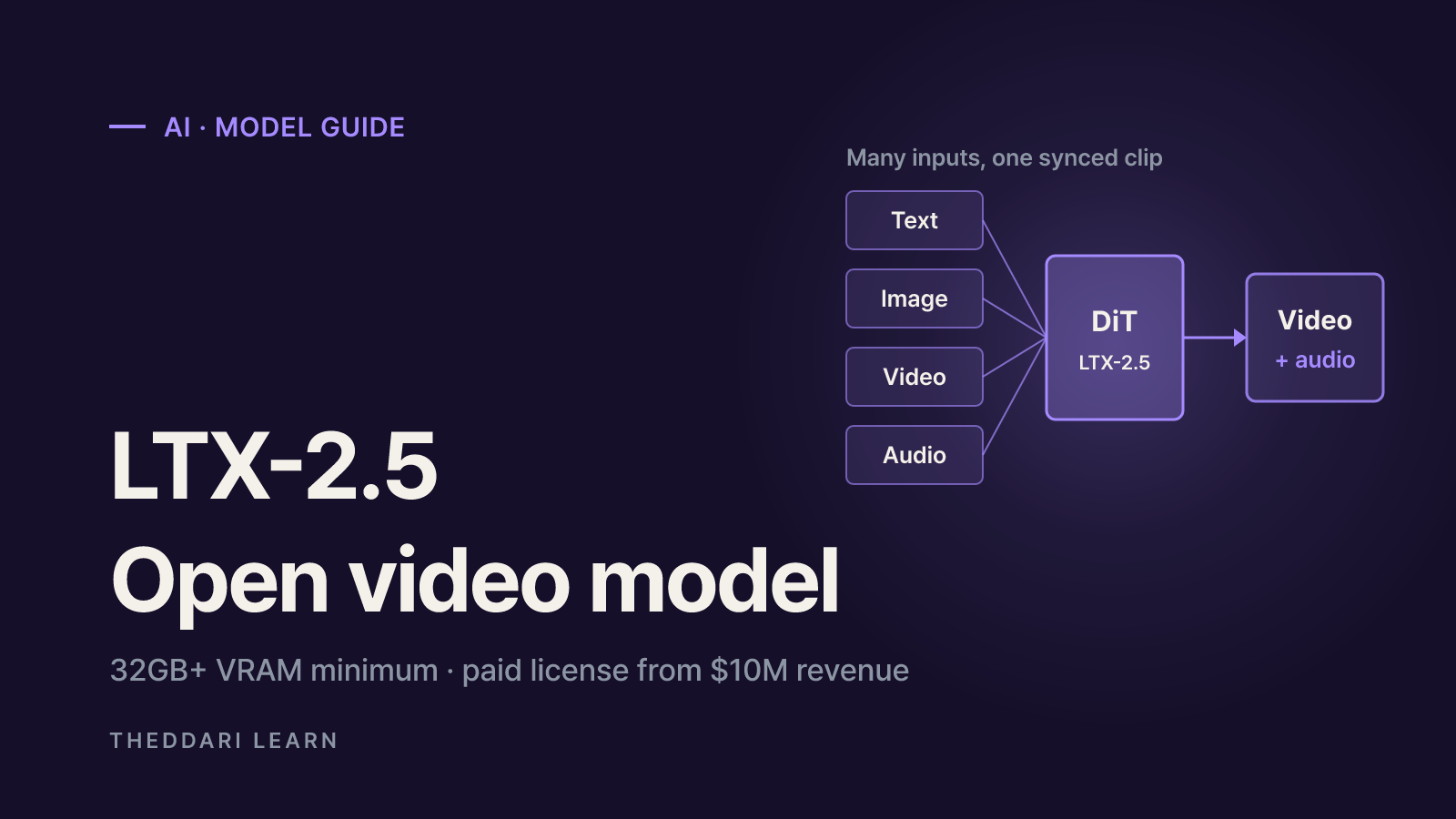
LTX-2.5 is an open-weight AI video generator from Lightricks that creates video with synchronized audio from text, images, video or audio. Unlike closed, cloud-only video tools, you can download the weights, run them on your own GPU or server and fine-tune them. As of October 2026, this guide draws on the Hugging Face model card, the official documentation and the license text to explain what the model does, what hardware it expects and when commercial use requires a paid license. It does not rank LTX-2.5 against other video models, because the official sources do not provide independent benchmark comparisons.
What is LTX-2.5?
The official overview describes LTX-2.5 as an open world model built for local execution and fine-tuning. A single diffusion transformer (DiT) generates video and audio together, and LoRA or IC-LoRA adapters can steer style, motion and structure. The transformer files on the model card carry a 22b label, indicating a checkpoint of roughly 22 billion parameters. Lightricks is careful to say that video and audio generation is the established use case, while robotics and physical-AI applications are still developing.
The weights ship as a split pack, with one file per component rather than one monolithic checkpoint. You get a fast distilled transformer, a trainable dev transformer, a Gemma 4 12B text encoder with projections, separate video and audio VAEs, 2x spatial and temporal upscalers, and a duration-prediction patch. The repository is gated: you must sign in to Hugging Face and agree to share contact information before downloading.
What's new compared with earlier LTX versions
Native multishot
- What changed
- Several connected shots in one generation
- Why it matters
- Earlier versions produced one continuous shot; 2.5 aims to keep characters, lighting and voice consistent across cuts
Diffusion video decoder
- What changed
- Replaces the VAE reconstruction stage
- Why it matters
- Targets sharper faces, textures, on-screen text and fast motion
Diffusion fidelity rendering
- What changed
- Allocates compute by scene complexity and budget
- Why it matters
- Avoids one fixed compression rate for every scene
Gemma 4 12B text encoder
- What changed
- Stronger prompt understanding
- Why it matters
- Designed to keep multiple characters, camera moves and lighting cues intact
Automatic duration
- What changed
- Predicts clip length from the prompt
- Why it matters
- Optional; you can still set the frame count yourself
Native EXR
- What changed
- EXR input and output
- Why it matters
- Lets post-production work avoid a lossy 8-bit round trip
The distilled checkpoint runs a fixed 8-step schedule with CFG set to 1. Lightricks says the 2.5 distilled model keeps much more of the full model's quality, prompt adherence and motion consistency than before; that is the developer's own claim, so look for independent tests as well. An optional prompt enhancer expands short prompts into more cinematic instructions, and you can switch it off when you want your exact wording preserved.
What you can do with LTX-2.5
The Quick Start guide routes users by input type. Text-to-video creates a clip and its soundtrack from a prompt. Image-to-video animates a single still or fills in motion between a first and last frame. Audio-to-video times footage to an existing track, and a text-to-audio workflow produces sound with no video branch.
- Storyboards and short-form drafts: use multishot prompts to rough out several shots with the same character in one pass.
- Animating stills: set a product photo or illustration as the first frame and describe the camera move.
- Controlled video-to-video: IC-LoRA adapters accept depth, edge or pose references, and a motion-control adapter follows tracks you draw.
- VFX helpers: documented workflows cover alpha mattes, SDR-to-HDR conversion, inpainting and outpainting, and high-resolution refinement.
- Custom styles: the dev transformer is fully trainable with the LTX-2 Trainer for LoRAs or full fine-tunes.
Two caveats matter. First, the Foley (sound effects for muted video) and Dub-It (lip-synced dubbing) workflows are labeled LTX-2.3 only, and the docs warn against substituting 2.5 assets. Second, the model card's limitations section says the model does not provide factual information, may amplify societal biases, may produce inappropriate content and may not match prompts perfectly. Plan for human review rather than publishing raw output.
LTX-2.5 local hardware requirements and setup
The overview page says the model runs on consumer GPUs, yet the system requirements page sets a 32GB VRAM floor. In practice that rules out most 8GB to 16GB gaming cards at default settings.
GPU
- Minimum
- NVIDIA with 32GB+ VRAM
- Recommended
- NVIDIA A100 (80GB) or H100
System RAM
- Minimum
- 32GB
- Recommended
- 64GB or more
Storage
- Minimum
- 100GB free
- Recommended
- 200GB+ SSD
CUDA
- Minimum
- 12.7 or newer
- Recommended
- 12.7 or newer
Python
- Minimum
- 3.12 or newer
- Recommended
- 3.12 or newer
If you are short on memory, the model card lists low-VRAM options: ltx-pipelines can cast the bf16 transformer to fp8 on the fly and offload to the CPU, and ComfyUI users can load int8 checkpoints. Those int8 files are ComfyUI-only and will not load in the PyTorch pipeline, while the NVFP4 file expects Blackwell-class GPU kernels. Saving memory usually costs generation time and may change output quality.
- 1
Pick a runtime
ComfyUI templates are the fastest route for newcomers. Use the Python ltx-pipelines package for scripted or automated work, or the LTX-2.5-Diffusers pack if your code already uses Diffusers; as of October 2026 the model card says Diffusers support requires installing from the main branch.
- 2
Get access to the weights
Sign in on Hugging Face and click Agree and Access on the model page. In ComfyUI, install the LTXVideo node pack and let the template download any missing files.
- 3
Respect the shape constraints
Frame counts must satisfy frames mod 8 = 1 (for example 121), and width and height must be divisible by 32. That is why the 1080p example uses 1920x1088 and the 4K example uses 3840x2176. Omit the frame count to let automatic duration choose.
- 4
Start small, then scale
Test memory use and speed at low resolution and short length, then add the upscaler or detail pipeline. Reusing the same seed makes it easier to see what a setting change actually did.
No suitable GPU? The hosted API is the alternative. According to the LTX-2.5 API page, ltx-2-5-fast and ltx-2-5-pro produce portrait or landscape video up to 4K; fast offers 6 to 20 seconds at 720p and 1080p at 24 or 25 fps, while pro offers 6 to 10 seconds. API usage is billed per second of output, so compare that with the cost of owning or renting GPU time.
Commercial use and the LTX-2.x Community License
LTX-2.5 is often called an open-source video model, but it is released under the LTX-2.x Community License Agreement dated August 11, 2026, not under Apache 2.0 or MIT. The dividing line is revenue. Entities with at least $10 million in annual revenue, counted together with subsidiaries and commonly controlled affiliates, need a paid Commercial Use Agreement for anything beyond the defined non-commercial purposes. Smaller entities may use the model commercially and in production at no cost.
| Scenario | Community license outcome |
|---|---|
| Freelancer or startup under $10M revenue making paid content | Allowed at no cost |
| Employee of a large company experimenting for a personal hobby | Non-commercial if unconnected to work |
| Large company testing in a non-production environment | Allowed as non-commercial evaluation |
| Large company shipping it to users, earning revenue or training commercial models | Paid agreement required first |
| Handing a fine-tuned LoRA to a large company | Recipient must hold a paid license; written notice required |
Other obligations apply regardless of size. Redistribution or hosting as a service requires passing on the use restrictions and a full copy of the license. You may not remove or circumvent watermarking, provenance metadata or other transparency features, and you must follow applicable AI rules such as the EU AI Act and the California AI Transparency Act; the license allows Lightricks to revoke it if those features are disabled. Lightricks claims no rights in your output, but responsibility for inputs and outputs is yours. For commercial projects, read the full text and get legal advice where needed.
Keeping up with AI video model news
Video models and their licenses change quickly. The theddari AI Telegram trend page collects which models and issues AI communities are discussing, and the blog trend page shows how new releases surface in hands-on posts and tutorials. Mention volume signals attention, not quality or safety, so confirm features, requirements and license terms against the official model card and docs.
 theddari.comTrendsBlog PostsSummarized Naver blog posts