Contents7 sections
Hugging Face model names are easiest to read as a sequence: base model, size, fine-tune goal, version, weight encoding and file type. In Qwen3-30B-A3B, 30B is the total parameter count and A3B is the number of parameters activated for each token. A trailing Q4_K_M or a -GGUF repository suffix tells you how the weights are stored and compressed, not how good the model is. That ordering is a convention, not an enforced standard, so the model card and file metadata remain the final word. As of October 2026, this guide is based on the ggml GGUF specification, the Hugging Face Hub and TRL documentation, and the official Qwen model card.
The anatomy of Hugging Face model names
The most explicit rulebook is the GGUF naming convention in the ggml repository. It recommends file names in the form [Sidecar]-BaseName-SizeLabel-FineTune-Version-Encoding-Type-Shard.gguf, with each part separated by a hyphen. The spec says the goal is to let humans see the most important details at a glance, and it admits the format is not meant to be perfectly parsable because existing names vary so much. Repository names on the Hub are under no obligation to follow it at all.
Sidecar (optional)
- Example
- mmproj, mtp
- What it tells you
- An auxiliary module loaded alongside a base model: a multimodal projector or multi-token prediction heads
BaseName
- Example
- Qwen3, Mixtral
- What it tells you
- The base model or architecture
SizeLabel
- Example
- 27B, 8x7B
- What it tells you
- Parameter class, optionally as expert count x size
FineTune
- Example
- Instruct, Chat
- What it tells you
- What the model was tuned for
Version
- Example
- v0.1, v1.0
- What it tells you
- Release version; assume v1.0 if missing
Encoding
- Example
- F16, Q4_K_M
- What it tells you
- Weight encoding or quantization scheme
Type
- Example
- LoRA, vocab
- What it tells you
- Blank for a normal model file; LoRA adapter or vocab-only file
Shard (optional)
- Example
- 00003-of-00009
- What it tells you
- Position in a multi-file split, five digits, starting at 00001
According to the spec, a compliant name needs at least BaseName, SizeLabel and Version. It warns that when the version is missing, the encoding is easily mistaken for a fine-tune label. Community repositories often skip the version or stack several training acronyms together, so read each hyphen-separated piece by meaning rather than position.
Size prefixes and labels like 8x7B
The scale letters are K (thousand), M (million), B (billion), T (trillion) and Q (quadrillion) parameters, and rounded decimals are allowed. That is why the name and the exact count on the model card can differ slightly. A label like Mixtral-8x7B uses the expert-count form: eight experts at a 7B class. Do not multiply the two numbers and treat the result as the total, because parts of the network may be shared; read the total from the model card. The convention also allows extra attributes after the size, such as -ContextLength4k.
A3B and A4B: active parameters in MoE models
When a name contains two sizes, such as 30B-A3B or 29B-A4B, you are almost always looking at a mixture-of-experts (MoE) model. The first number is the total parameter count and the number after A is how many parameters are active when processing one token. The Qwen3-30B-A3B model card lists 30.5B parameters in total, 3.3B activated, and 8 of 128 experts used per token. The 30B and A3B in the name are rounded tags for those figures. By the same logic, A4B suggests roughly 4B active parameters, but confirm the exact number on that model's own card.
Parameters used per token
- Dense model
- All of them
- MoE model (e.g. 30B-A3B)
- Only the active set (e.g. 3.3B)
Weights stored in the file
- Dense model
- All
- MoE model (e.g. 30B-A3B)
- All experts (e.g. 30.5B)
Basis for download and disk size
- Dense model
- Total size
- MoE model (e.g. 30B-A3B)
- Total size
Typical label
- Dense model
- 27B
- MoE model (e.g. 30B-A3B)
- 30B-A3B
The most common mistake is treating an A3B model like a 3B model. Fewer active parameters cut the compute per token, but every expert's weights are still in the file; the Hub page for Qwen3-30B-A3B shows a model size of 31B params. Budget storage and download time around the total. Speed and memory needs then depend on your runtime and whether it keeps experts in GPU memory, system RAM or a mix. Do not compare quality or speed with a dense 3B model based on the active count alone.
GGUF meaning and quantization labels like Q4_K_M
The Hugging Face Hub GGUF documentation describes GGUF as a binary format optimized for fast loading and inference with GGML-based executors such as llama.cpp. Unlike safetensors, which holds tensors only, GGUF bundles the tensors with a standardized set of metadata. A -GGUF suffix on a repository therefore means someone converted the model into this format; it does not mean the model itself is different. The Hub's GGUF viewer lets you inspect metadata and per-tensor types before downloading.
A GGUF repository usually offers the same model at several precision levels. Quantization stores weights with fewer bits to shrink file size and memory use. The figures below are the average bits per weight given in the Hub documentation.
F16 / BF16
- Bits per weight
- 16
- Notes
- 16-bit floating point; usually the closest to the original
Q8_0
- Bits per weight
- 8-bit
- Notes
- Round-to-nearest in 32-weight blocks; listed as a legacy type
Q6_K
- Bits per weight
- 6.5625
- Notes
- K-quant super-block layout
Q5_K
- Bits per weight
- 5.5
- Notes
- K-quant
Q4_K
- Bits per weight
- 4.5
- Notes
- K-quant; the main type in Q4_K_M files
IQ4_XS
- Bits per weight
- 4.25
- Notes
- Uses an importance matrix
Q3_K
- Bits per weight
- 3.4375
- Notes
- K-quant
Q2_K
- Bits per weight
- 2.625
- Notes
- K-quant; smallest here, with the largest precision loss
Break the label down: the digit after Q is the approximate bit width, K marks the k-quant super-block scheme, and a leading I marks importance-matrix types. Labels ending in _0 or _1, such as Q4_0, are older block formats the Hub docs call legacy. The final letter in Q4_K_M distinguishes mixes within the same family. The GGUF spec names the file type MOSTLY_Q4_K_M because the label describes the majority of tensors; some tensors may use another type. A separate general.quantization_version field can also change while the scheme name stays the same.
Estimate file size from parameters and bits
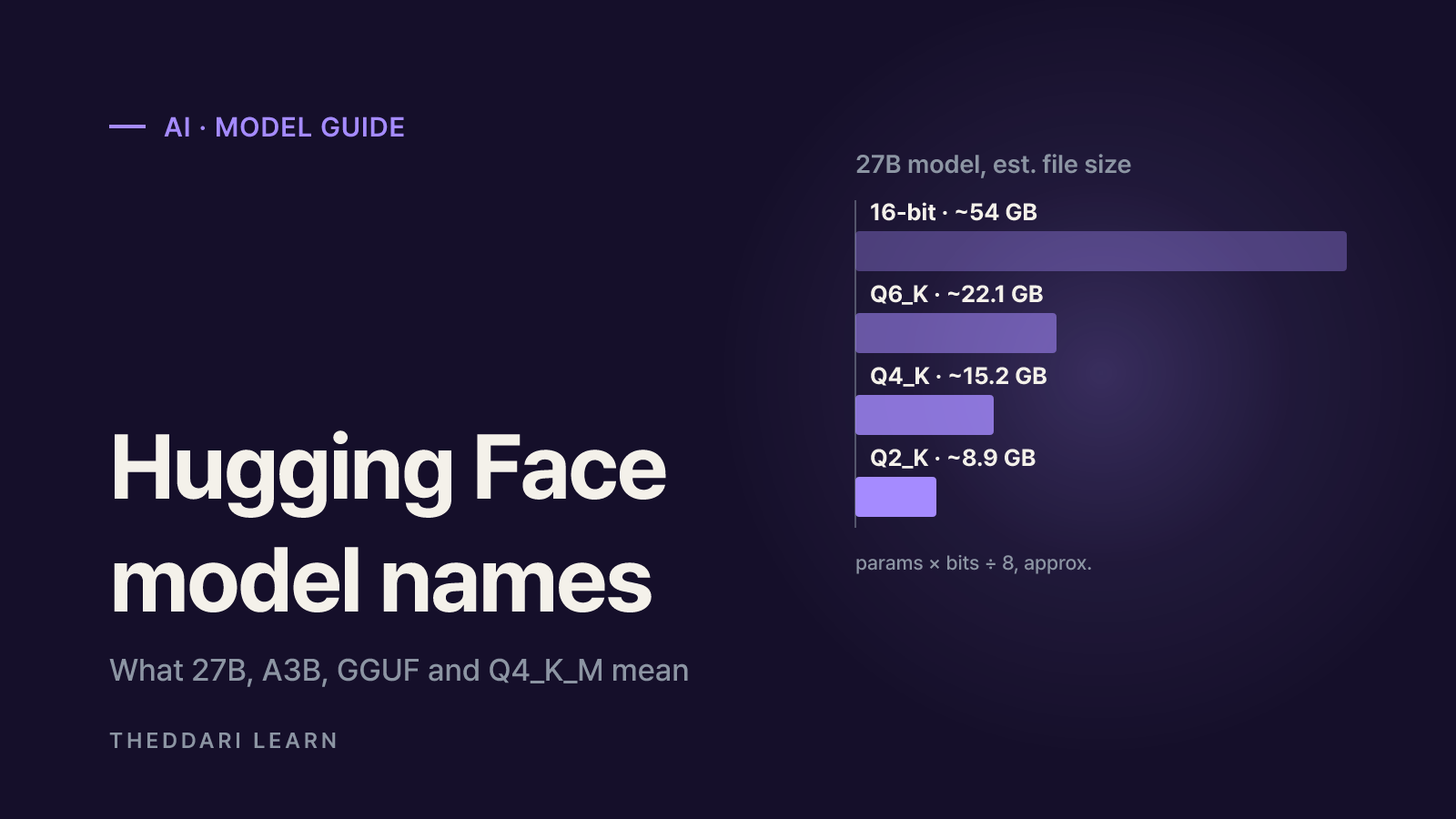
A rough size estimate is parameters multiplied by bits per weight, divided by eight. For a 27B model that gives about 54 GB at 16 bits, 22.1 GB at Q6_K, 15.2 GB at Q4_K and 8.9 GB at Q2_K, using decimal gigabytes as a theoretical approximation. Real files differ because of mixed tensor types and metadata, and running the model needs extra memory that grows with context length. Lower bit widths raise the risk of quality loss, but the impact varies by model and task, so compare two or three files that fit your hardware.
Training labels: Instruct, SFT, RLOO and friends
Instruct and Chat fill the FineTune slot of the naming convention, meaning the model was tuned to follow instructions or hold conversations; Base usually marks a pretrained-only checkpoint. The TRL SFT Trainer docs describe supervised fine-tuning as the simplest and most common way to adapt a language model: training on input and output pairs while minimizing the negative log-likelihood of the target tokens.
The TRL RLOO Trainer docs describe RLOO as an online, REINFORCE-style reinforcement learning algorithm. It samples several completions per prompt and scores each against a leave-one-out baseline, the average reward of the other completions. When a name includes SFT, RLOO, GRPO, DPO or LoRA, the uploader is telling you how they say they trained it. The name does not tell you the data, the amount of training or whether anyone evaluated the result.
Some trending repositories string together the names of well-known commercial models and several training acronyms. Those words are the uploader's description, not an official release or certified performance from those companies. Check the base_model field to see where the weights actually came from.
Checking fine-tunes and merges before you use them
The Hugging Face model card documentation lets fine-tunes, adapters, quantizations and merges declare their parent in the base_model metadata, and the Hub infers the relationship as adapter, merge, quantized or finetune for the model tree. When checked in October 2026, the Qwen3-30B-A3B model tree linked 153 quantizations, 77 fine-tunes, 65 adapters and 6 merges. With that many derivatives around a popular model, lineage is more useful than the name.
- 1
Follow base_model and the model tree
Confirm which original the weights came from and whether the relationship is quantized, finetune, adapter or merge. An empty base_model field means you have little evidence about provenance.
- 2
Inspect the files
Check whether the repository holds GGUF or safetensors, which quantization files and shards exist, and whether a sidecar such as mmproj is required. Open the GGUF viewer for metadata.
- 3
Read the license
A derivative still has to respect the original model's license. Compare the license on the card with the terms in the parent repository.
- 4
Look for training and evaluation details
See whether datasets, methods and evaluation results are published. Models described as uncensored, with safety behavior removed, need a separate risk review before any work or product use.
- 5
Run a small comparison
Send a few prompts that resemble your real workload to the official model and the derivative under the same settings. Downloads and trending rank measure attention, not quality.
When an unfamiliar model name starts circulating, it also helps to see the context people discuss it in. The theddari AI Telegram trends page shows keywords frequently mentioned in AI channels, and the blog trends page shows topics that are getting written about. A spike in mentions reflects interest only; it does not confirm quality or safety, so return to the model card checks above once you have found the name.
 theddari.comTrendsBlog PostsSummarized Naver blog posts
In short, the size label tells you scale, the A label tells you active scale per token, GGUF and Q4_K_M describe storage format and compression, and acronyms like SFT or RLOO describe a claimed training method. Separate those four ideas and even a very long name becomes readable. Then confirm base_model, license, file layout and published evaluations on the model card, and test a file that fits your hardware before relying on it.