Real-Time US Stock Quotes for Free: Delayed vs Live Prices
Where to get real-time US stock quotes for free, why many prices run 15 minutes late, and how Nasdaq Basic differs from full broker data (Nov 2026).
Contents6 sections
Key takeaways
- You can see real-time US stock quotes for free, but free feeds such as Nasdaq Basic cover Nasdaq venues and FINRA-reported trades rather than every US exchange.
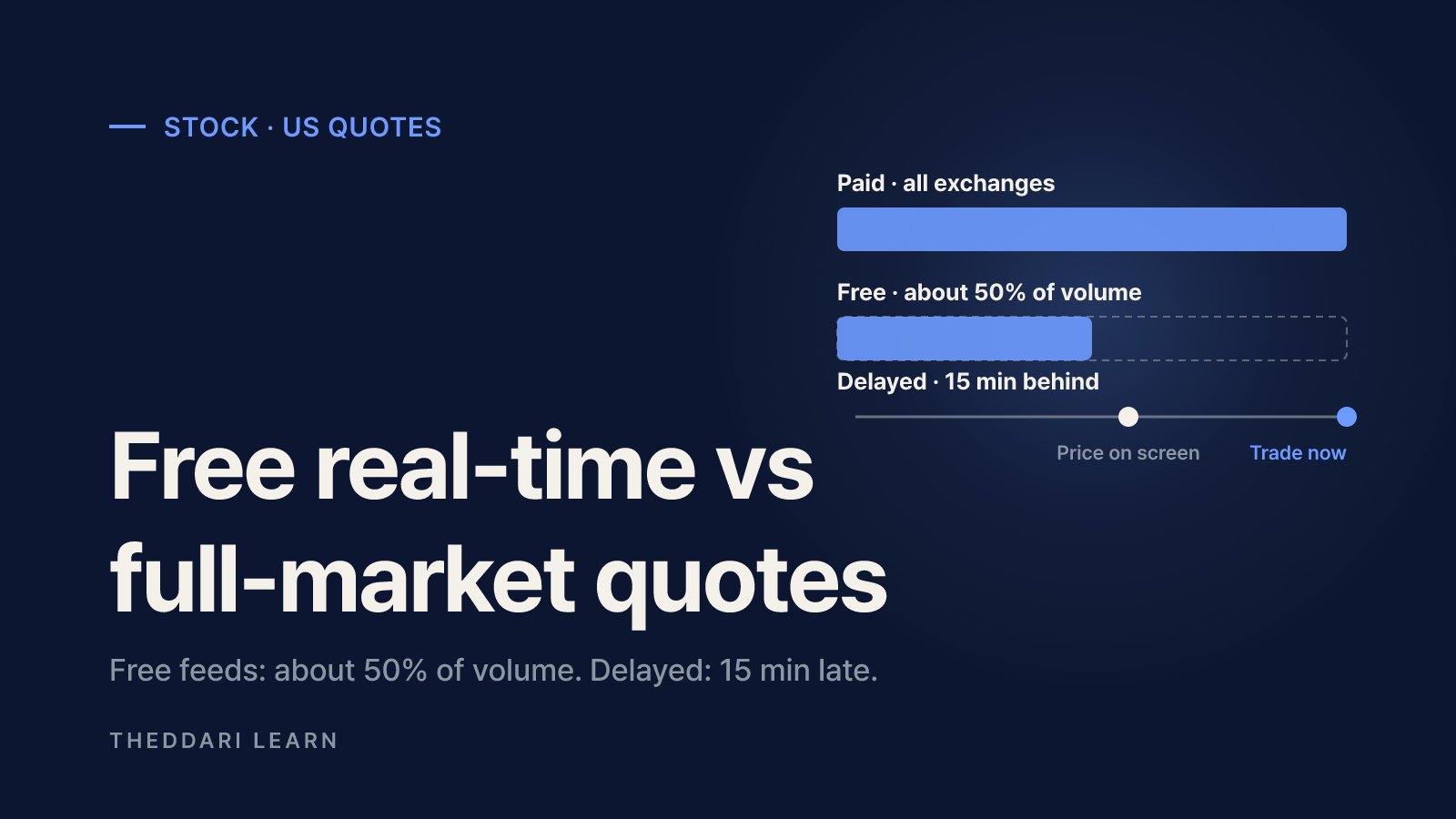
- One broker's disclosure puts its free Nasdaq-based feed at roughly 50% of consolidated volume, with official open, high, low, close and total volume filled in after the close.
- Yahoo Finance lists Nasdaq-listed stock quotes as real-time, while NYSE and Cboe indices, options (OPRA) and OTC Markets quotes are delayed 15 minutes.
- Brokers that do not include real-time data often show 15-minute delayed quotes until you subscribe or meet an activity condition.
- Orders route to the full market regardless of which quote feed you watch, so thinly traded stocks can fill away from the price on a free screen.
Yes, you can get real-time US stock quotes for free, but "real-time" on a free site rarely means the whole market. Most free live prices come from Nasdaq's own data products, which cover trades on Nasdaq venues plus off-exchange trades reported to a FINRA facility. The full consolidated view across every US exchange usually sits behind a broker subscription. This guide, based on official provider and broker pages checked in November 2026, explains the difference between delayed and live quotes, how to tell which one you are looking at, and when paying for full-market data actually matters.
If you checked the stock market today on a news site and saw a slightly different number from your brokerage app, nothing is necessarily broken. The two screens are often drawing on different venues, or one of them is running on a delay.
Delayed vs real-time US stock quotes
A delayed quote shows prices with a fixed lag after the trade happened. For US stocks, 15 minutes is the most common delay. A real-time quote updates as trades print. The twist in the US is market structure: a single stock trades on many exchanges and off-exchange venues at once, so a real-time quote is only as complete as the set of venues feeding it.
What Nasdaq Basic covers
The free real-time feed you see on many websites and apps is often Nasdaq Basic. According to Nasdaq's product page, it provides real-time best bid and offer and last sale data for all US exchange-listed stocks, based on liquidity within the Nasdaq market center and trades reported to the FINRA/Nasdaq Trade Reporting Facility. It covers NYSE, NYSE American and Nasdaq-listed stocks and ETFs, and Nasdaq offers a digital media license that lets publishers display it to the general public without per-user fees.
Paid consolidated data, by contrast, combines quotes and trades from all participating exchanges under the UTP plan (Nasdaq-listed securities) and the CTA plan (NYSE and other listings). One broker's disclosure gives a sense of the gap: Mirae Asset Securities says its free Nasdaq-licensed feed draws on three Nasdaq exchanges plus FINRA and represents about 50% of UTP/CTA volume, while its paid feed draws on data from 17 UTP and 19 CTA participants (Mirae disclosure, in Korean).
Venues
- Free Nasdaq-based feed
- Nasdaq venues + FINRA-reported trades
- Paid consolidated feed
- All UTP/CTA participating exchanges
Share of volume (one broker's estimate)
- Free Nasdaq-based feed
- About 50%
- Paid consolidated feed
- Full consolidated volume
Open, high, low, close
- Free Nasdaq-based feed
- Finalized after the close
- Paid consolidated feed
- Consolidated during the session
Best bid and offer
- Free Nasdaq-based feed
- Best within Nasdaq's market center
- Paid consolidated feed
- National best across exchanges
Typical cost
- Free Nasdaq-based feed
- Free on many sites and apps
- Paid consolidated feed
- Monthly exchange fee via a broker
How to check if a site shows real-time US stock quotes
Delays can differ by asset class on the same site, so the most reliable check is the provider's own delay table. Yahoo Finance's help page publishes one, listing each market's delay and data provider.
| Yahoo Finance coverage (US) | Delay |
|---|---|
| Nasdaq Stock Exchange | Real-time |
| Dow Jones indexes and S&P indices | Real-time |
| NYSE indices and Cboe indices | 15 min |
| Options (OPRA) | 15 min |
| OTC Markets Group | 15 min |
| CME and CBOT futures | 10 min |
In other words, a stock quote can be live while an index or options chain on the same page is delayed. Yahoo also states that its data is provided for informational purposes only and is not intended for trading, which is a good reminder to confirm prices in your brokerage before placing an order.
- 1
Read the timestamp
Compare the 'as of' time next to the price with the current time. A gap of 15 minutes or more during market hours means you are looking at delayed data.
- 2
Look for labels
Search the quote box for 'Delayed', 'Real-time' or a named data source such as Nasdaq or ICE Data Services.
- 3
Check the delay table
Find the site's exchange and data provider page and match the stock, index or option you are watching to its row.
- 4
Cross-check before trading
Compare the bid, ask and last price with your broker's order ticket. A large gap points to venue coverage differences or thin trading.
Price moves rarely happen in a vacuum. Before reading too much into a sudden swing, check whether a scheduled jobs or inflation release, or an earnings report, was due. The theddari economic calendar lists major macro release times, and the earnings calendar shows upcoming report dates. They tell you when events happen, not which way prices will go.

Broker apps: free, delayed or paid
Brokers generally take one of two approaches. Some include a free Nasdaq-based real-time feed by default and sell full consolidated data as an add-on. Others show 15-minute delayed quotes until you subscribe or meet an activity condition. Two examples from South Korea, checked in November 2026, show both models for investors who buy US stocks through an overseas broker:
- Mirae Asset Securities provides free Nasdaq-based real-time quotes on US stocks by default. Its paid consolidated feed costs USD 2 a month for Nasdaq and USD 2 each for NYSE and NYSE American for non-professionals, renews monthly and is not refunded for unused days.
- Kiwoom Securities shows 15-minute delayed US quotes unless you sign up for real-time data. The fee is USD 8 a month and is waived if you traded in the previous month.
Whatever broker you use, look in the app's market data or quote subscription settings. Check three things before you sign up: which venues the feed covers, whether the fee auto-renews, and whether you have been classified as a non-professional or professional user.
Pre-market, after-hours and other pitfalls
Extended-hours sessions have fewer participants and sparse trading. A free feed that covers only some venues can leave the last price stuck at an old print, and prices on different screens can drift further apart than during regular hours. Mirae's disclosure notes that free and paid feeds can show different last prices and charts, and that the gap can be larger for thinly traded stocks and ETPs.
- Orders hit the whole market. Mirae states that US orders are routed and executed through the same system regardless of which quote feed you use, so the fill reflects the consolidated market, not your screen.
- Session highs and lows can change. On a free feed, official open, high, low, close and total volume are updated after the close, so intraday extremes may look different the next day.
- Paid feeds may be single-device. Mirae's paid real-time data is delivered only to the most recently connected device; earlier sessions fall back to the free feed, which explains why a phone and a desktop can disagree.
- Personal-use rules apply. Non-professional market data is for personal, non-business use. Recording and redistributing quote screens can breach the exchange agreement.
If a stock jumps after hours, find out why before reacting. The theddari Telegram stock trends page collects topics that US-stock channels are discussing, which can point you toward the news. Treat mention counts as a measure of attention, not evidence, and confirm with filings or company releases.
Bottom line: a free real-time feed is enough to see roughly where a stock is trading. For short-term trading, tight limit orders or thinly traded names, full consolidated data is more accurate. Making a habit of checking the timestamp, the delay label and the data provider will prevent most price-screen surprises.
Frequently asked questions
Is Google or another free site showing live stock prices?
Why does my free quote differ from my broker's price?
Is a 15-minute delay a problem for long-term investors?
What does non-professional status mean for market data?
Sources and references
- 1Nasdaq Basic product overview(opens in a new tab)www.nasdaq.com
- 2Yahoo Help: Exchanges and data providers on Yahoo Finance(opens in a new tab)help.yahoo.com
- 3Mirae Asset Securities: overseas stock quote disclosures (Korean)(opens in a new tab)securities.miraeasset.com
- 4Kiwoom Securities: overseas stock guide and quote fees (Korean)(opens in a new tab)www.kiwoom.com
Related articles
 Stocks
Nvidia Options Explained: Calls, Puts and Big Stock Moves
Why Nvidia calls and puts can swing far more than the stock itself: intrinsic value, time value and implied volatility explained, plus the training and tax rules Korean residents face before trading US stock options.
 Stocks
AI PCB Stocks: Substrates vs Server Boards, Traps to Avoid
Not every circuit board company gets the same slice of AI server spending. Here is how the substrate and PCB supply chain breaks down, and the filings-based metrics that expose AI stock traps, as of November 2026.
 Stocks
Why the Anthropic IPO Didn't Stop the AI Stock Selloff
Anthropic raised $81bn in the largest IPO on record, yet the Nasdaq wiped out its 2026 gains the next day. Here is how a blockbuster listing and an AI selloff can happen at once.