Contents6 sections
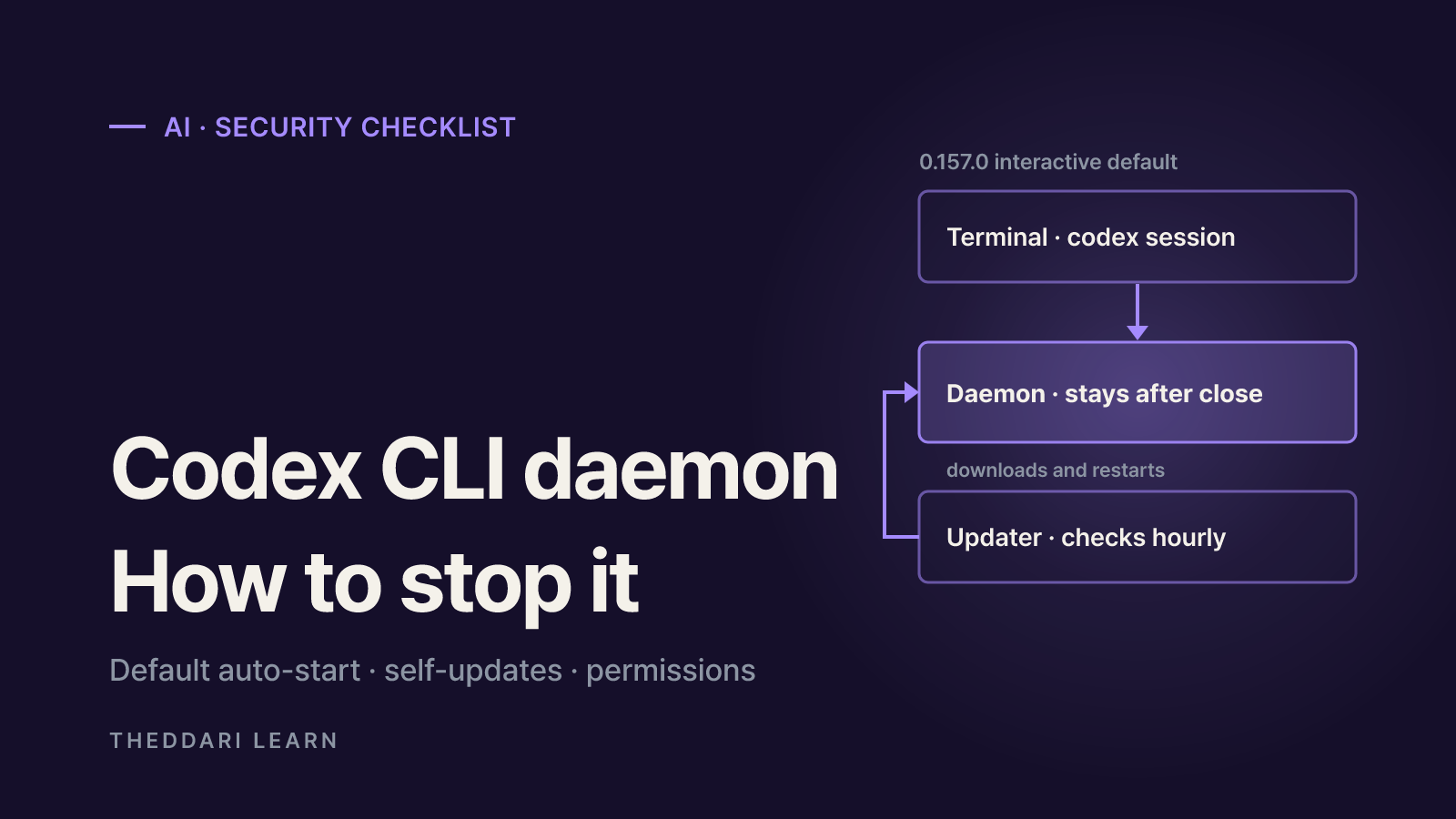
Yes, in a sense: starting with version 0.157.0, opening an interactive codex session can launch a Codex CLI daemon in the background by default. OpenAI's 0.157.0 release notes describe the change as "automatic background-server startup for eligible interactive sessions," and the changelog includes a pull request titled "Enable automatic daemon startup by default" (#47179). Users then reported that the process keeps running after every window closes and updates itself. As of October 13, 2026, this guide summarizes what the public GitHub issues say, how to check for and turn off the daemon, and what to review before installing any AI coding tool.
Most of the behavior described below comes from user reports in GitHub issues, not from official OpenAI documentation. Details can vary by operating system, install method and version. As of October 13, 2026, no OpenAI response or change to the default is visible in the issue thread.
What the Codex CLI daemon issue reports
GitHub issue #48195, opened on September 25, 2026, asks OpenAI to make daemon_auto_start opt-in for the CLI, or at least to ask the user once before enabling it. The reporter was running 0.157.0 installed with npm install -g @openai/codex on Linux under WSL2. The issue carries the CLI, app-server and enhancement labels and had no assignee at the time of writing. The reporter described four behaviors:
- A persistent process.
codex app-server --managed-daemonruns in its own session without a terminal, is reparented to PID 1, and survives until you runcodex app-server daemon stopor reboot. - A copied package. Roughly 374 MB of platform files, including the codex binary and bundled bwrap, zsh and rg, are copied to
~/.codex/packages/app-server-daemon/releases/<version>/, and the daemon runs from that copy. Its version is then decoupled from the CLI your package manager installed. - A self-updater. A separate
codex app-server daemon pid-update-loopprocess checks for updates five minutes after launch and hourly after that, downloads new releases and restarts the backend. - A pinned environment. Whichever session started the daemon fixes its environment. The reporter's per-invocation
HTTPS_PROXYstayed in effect for later sessions launched with different settings.
The reporter also found that codex app-server daemon stop left the updater running 70 seconds later, so it had to be killed by hand. A Windows 10 user in the same thread confirmed that adding daemon_auto_start = false to config.toml stopped the behavior.
Why developers treat it as a security issue
The background server has legitimate uses; the reporter acknowledged it makes sense for Remote Control and the desktop app. The objection is that the default changed in a minor version with little notice. A process you did not explicitly start now downloads and swaps in new binaries, so the code executing your agent's commands may not be the version you installed and reviewed. One commenter framed it as the gap between the installed CLI's identity and the daemon's execution identity. In companies that approve software versions centrally, unattended self-updates can also break change-management rules.
There is a reliability cost too. Issue #40969, opened on August 26, 2026, reports that when the daemon auto-updates, it gives running work a 60-second drain window before sending SIGKILL. Agent turns that run multi-minute build or test suites can be cut off on every update, and the issue states there is no supported way to disable auto-update. That issue was also still open as of October 13, 2026.
How to check for and disable the Codex CLI daemon
These steps collect what the reporter and other users shared. They are community workarounds rather than a documented procedure, so read the output of codex --help and codex app-server daemon --help for your version first.
- 1
Look for the processes
On macOS or Linux, run
pgrep -lf "codex app-server"and look for--managed-daemonorpid-update-loop. On Windows, check the Details tab in Task Manager. If the processes are still there after you close every Codex window, the daemon is resident. - 2
Turn off auto-start
The reporter used
codex features disable daemon_auto_start; another user setdaemon_auto_start = falsein~/.codex/config.toml. A--no-daemonflag is mentioned for one-off runs. Open a new session afterward and confirm no daemon appears. - 3
Stop the daemon and verify the updater
Run
codex app-server daemon stop, then checkpgrep -lf pid-update-loopagain. If the updater survived, as reported, note its PID and end only that process. Killing by a broad name pattern can take down unrelated work. - 4
Remove the copied package if unused
If you do not need the daemon, review the size of
~/.codex/packages/app-server-daemonand remove it. First confirm you are not relying on Remote Control or the desktop app, which use the background server.
check_for_update_on_startup = false controls the client's startup update check. A comment on issue #40969 reports that it does not stop the daemon's update loop. Do not treat the two settings as equivalent.
Security checklist before installing an AI coding tool
This is not only a Codex question. AI coding CLIs typically combine shell execution, file edits and network access, which gives them a larger footprint than an ordinary linter or formatter. Run through these checks before and after installing one.
Resident processes
- How to verify
- Close all windows, then list processes
- Codex notes
- Daemon auto-start reported as default since 0.157.0
Self-updating
- How to verify
- Read release notes and update settings
- Codex notes
- Daemon updater reported as separate from the startup check
Sandbox scope
- How to verify
- Check default write scope and approval policy
- Codex notes
- Workspace-only writes by default; --yolo removes the sandbox
Network access
- How to verify
- Check whether spawned commands can reach the internet
- Codex notes
- Command network is off in default workspace-write
Local data
- How to verify
- Find where transcripts and credentials live
- Codex notes
- history.persistence controls transcript storage
Telemetry
- How to verify
- Check what is sent and whether it is opt-in
- Codex notes
- OpenTelemetry export is off by default
Keep the default sandbox and approvals
The Codex agent approvals and security documentation says the CLI and IDE extension enforce an OS-level sandbox (Seatbelt on macOS, bwrap plus seccomp on Linux) with no network access and writes limited to the active workspace by default. Paths such as .git and .codex inside writable roots stay read-only. The --dangerously-bypass-approvals-and-sandbox flag, aliased --yolo, removes both the sandbox and approvals, and the docs mark it as not recommended. Habitually running with that flag is a bigger exposure than a background process.
Open untrusted repositories in isolation
The same page warns that prompt injection can lead an agent to fetch and follow untrusted instructions, and it points to Dev Containers as an outer isolation layer. It also cautions that if you disable the sandbox inside a container, a malicious project can exfiltrate anything in that container, including Codex credentials. One commenter on the daemon issue runs Codex on a separate hardened Raspberry Pi and connects over SSH. The principle is the same either way: keep experiments away from machines holding important credentials.
Read the changelog before upgrading
Scan release notes for anything touching processes, networking or permissions. In this case the change was a single line, and commenters noted it did not mention the resident process, the package copy or the hourly updater. Teams can pin versions and roll out upgrades after review so that behavior changes are visible.
Default changes and security debates around AI coding tools often surface first in developer communities. theddari's AI Telegram trends and blog trends pages collect what is being discussed, but confirm any setting against the tool's official docs and the original GitHub issue.
 theddari.comTrendsBlog PostsSummarized Naver blog posts
Open questions
The reporter proposed alternatives if the default stays on: exit an auto-started daemon when its last client disconnects, and skip the copy-and-update behavior when a package manager installed the CLI. A commenter also claimed the official configuration reference had no daemon_auto_start entry; documentation can change, so check it yourself. If OpenAI changes the default or documents an official opt-out, the steps above may no longer be necessary or may differ.