Contents8 sections
- What is Baidu Unlimited-OCR and how does it work?
- How good is it? Reading the benchmarks
- How to run Baidu Unlimited-OCR on a PDF
- Before you digitize receipts or financial documents
- Unlimited-OCR vs. traditional OCR tools
- Bottom line: a pre-deployment checklist
- Frequently asked questions
- Sources and references
Baidu Unlimited-OCR is an open-weight document OCR model that turns scanned pages, PDFs, and photos into Markdown text, keeping tables, formulas, and reading order. Its headline feature is long-horizon parsing: it is designed to transcribe dozens of pages in a single pass instead of looping page by page. This guide, checked against the Hugging Face model card and the technical report as of October 2026, covers how the model works, its license and hardware needs, a practical PDF workflow, and how to test accuracy on your own documents.
The model climbed Hugging Face's trending list, but popularity is not proof of quality. If you plan to digitize receipts, invoices, or financial statements, where one wrong digit matters, treat the published benchmarks as a starting point and run your own checks.
What is Baidu Unlimited-OCR and how does it work?
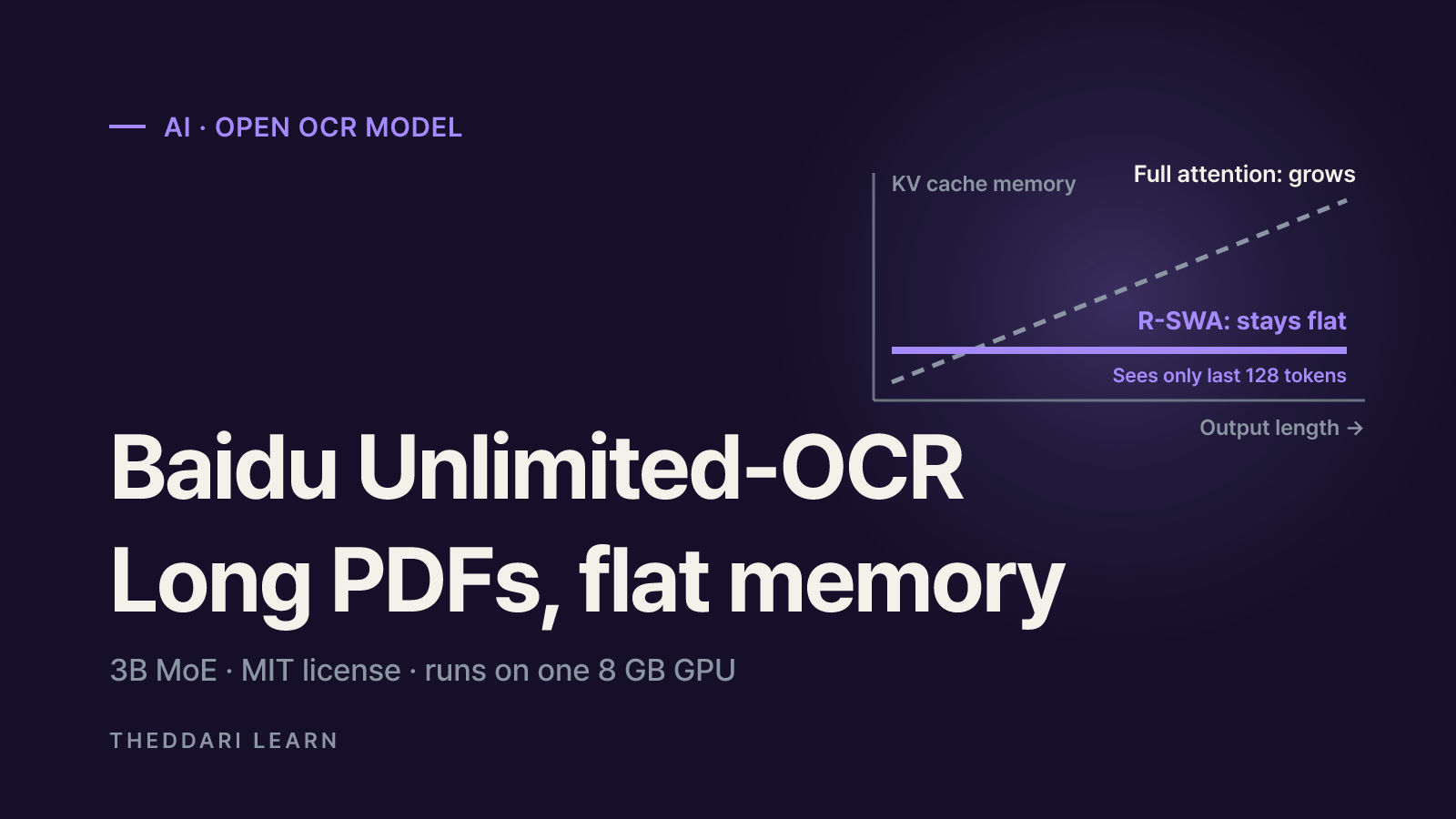
Unlimited-OCR starts from DeepSeek-OCR. Baidu kept DeepSeek's DeepEncoder, which compresses a 1024×1024 page image into about 256 visual tokens, and replaced every attention layer in the language decoder with a new mechanism called Reference Sliding Window Attention (R-SWA). The result is a Mixture-of-Experts model with 3B total parameters and roughly 0.5B active during inference.
Why R-SWA matters for long documents
Standard LLM-based OCR keeps every generated token in its KV cache, so memory use and latency climb as the transcript grows. R-SWA lets each new token see all of the reference tokens (the page images and the prompt) but only the previous 128 output tokens. Baidu compares this to a person copying a book: you look at the source and the last few words you wrote, not everything you have written so far. Because the cache never grows past that window, memory and speed stay roughly constant during decoding. The report measured output throughput at 6,144 tokens of about 7,848 tokens per second for Unlimited-OCR versus about 5,823 for DeepSeek-OCR under the same ideal settings.
Key facts at a glance
| Item | Detail (as of October 2026) |
|---|---|
| Release | June 22, 2026; paper arXiv 2606.23050 |
| License | MIT (Hugging Face and GitHub) |
| Size | 3B total / 0.5B active, BF16 safetensors |
| Base model | DeepSeek-OCR (DeepEncoder kept) |
| Max length | 32,768 tokens |
| Runtimes | Transformers (trust_remote_code), dedicated vLLM image, SGLang |
| Input modes | Single image: gundam (crop) or base; multi-page/PDF: base only |
| Also on | ModelScope, Baidu Cloud (added July 3, 2026) |
How good is it? Reading the benchmarks
The full technical report evaluates the model on OmniDocBench, a document parsing benchmark covering text, formulas, tables, and reading order. Higher overall scores and lower edit distances are better.
OmniDocBench v1.5 overall
- Unlimited-OCR
- 93.23
- Comparison
- DeepSeek-OCR 87.01; Gemini-2.5 Pro 88.03
v1.5 text edit distance
- Unlimited-OCR
- 0.038
- Comparison
- DeepSeek-OCR 0.073
v1.5 table TEDS
- Unlimited-OCR
- 90.93
- Comparison
- DeepSeek-OCR 84.97
OmniDocBench v1.6 overall
- Unlimited-OCR
- 93.92
- Comparison
- Qianfan-OCR 93.90; Logics-Parsing-v2 93.33
Two caveats. First, on v1.6 the margin over similar 2B–4B models is tiny, between 0.02 and 0.6 points. Second, the model card also shows an evaluation result from LlamaIndex's ParseBench with a mean of 46.17 and a text-content score of 86.81, a reminder that a different benchmark can tell a different story. Only your own documents will show where it is strong or weak.
Multi-page accuracy drops with length
In Baidu's in-house long-document test, edit distance was 0.0362 at 2 pages, 0.0526 at 10, 0.0572 at 20, and 0.1069 at 40+ pages, roughly three times worse at the long end. The authors attribute most errors to small text, because multi-page input only uses the lower-detail base mode at 1024×1024.
Despite the name, it is not unlimited. The report says that within a 32K context the prefill keeps growing with each page, so truly unlimited parsing is not yet possible.
How to run Baidu Unlimited-OCR on a PDF
The official paths are Hugging Face Transformers, vLLM, and SGLang. Start with a single image to confirm your setup, then move to full PDFs.
- 1
Prepare the environment
You need an NVIDIA GPU. The Transformers example was tested on Python 3.12.3, CUDA 12.9, torch 2.10.0, and transformers 4.57.1. The vLLM recipe says a single GPU with at least 8 GB of VRAM is enough for BF16 inference and serves the model from a dedicated Docker image because the architecture is not yet in a stable pip wheel.
- 2
Load the model safely
Load AutoModel and AutoTokenizer with trust_remote_code=True. That flag executes Python code from the model repository, so pin a reviewed commit with the revision argument.
- 3
Test one image
For a single receipt photo, use gundam mode (base_size 1024, image_size 640, crop on) and start the prompt with '<image>document parsing.'. Set the no-repeat n-gram size to 35 with a window of 128.
- 4
Convert and parse a PDF
Render each page to a 300 dpi image with PyMuPDF, then pass the list to infer_multi. Multi-page input supports base mode only (image_size 1024), and the n-gram window should be raised to 1024.
- 5
Clean the output
Raw output contains <|ref|> and <|det|> grounding tags with bounding boxes. Keep the text inside the ref tags and drop the det coordinates to get clean Markdown, or store the boxes separately if you need to trace text back to the page.
Common errors
- Empty output usually means the prompt lacks the literal <image> prefix or skip_special_tokens was left at True.
- Endless loops of coordinate tags on long documents mean the n-gram logits processor was not registered.
- The vLLM recipe disables prefix caching and the multimodal processor cache because OCR jobs gain nothing from image reuse.
Before you digitize receipts or financial documents
End-to-end OCR generates text with a language model, so a blurry digit can be replaced with a plausible but wrong one. That is fine for search indexing and risky for bookkeeping. Run this checklist first.
- Language coverage: the model card carries a multilingual tag but no supported-language list or per-language accuracy. Test the scripts you actually use.
- Ground truth: pick 20–50 real documents and have someone type the correct text to use as a reference.
- Metrics: measure character edit distance and, separately, exact-match rates for amounts, dates, and account numbers. A low overall error rate can still hide wrong totals.
- Tables: for statements and filings, check that row and column counts in the Markdown match the source.
- Review rules: route pages to a human when totals do not add up or the layout is unusual.
If you digitize company earnings releases, check report dates on the earnings calendar, then compare OCR'd revenue and profit lines against the original filing before using them. OCR saves typing; it does not guarantee the numbers.
Privacy and code-execution risk
Running the model locally keeps documents on your own machine. Uploading files to a public demo Space or a cloud API puts them under that service's terms, so avoid sending IDs or bank details. The Transformers documentation also warns to take extra care with custom models loaded through trust_remote_code and recommends pinning a specific revision.
Unlimited-OCR vs. traditional OCR tools
Approach
- Traditional or pipeline OCR
- Separate detection and recognition steps
- Unlimited-OCR (end-to-end)
- One model writes the whole page as Markdown
Tables and formulas
- Traditional or pipeline OCR
- Often need extra modules
- Unlimited-OCR (end-to-end)
- Output together with reading order
Long documents
- Traditional or pipeline OCR
- Each page processed independently
- Unlimited-OCR (end-to-end)
- Dozens of pages per pass, with accuracy loss
Hardware
- Traditional or pipeline OCR
- Many tools run on CPU
- Unlimited-OCR (end-to-end)
- NVIDIA GPU, 8 GB+ VRAM recommended
Typical error
- Traditional or pipeline OCR
- Garbled or missing characters
- Unlimited-OCR (end-to-end)
- Fluent but incorrect text
For clean scans with simple layouts processed in bulk, an established OCR engine may be enough. For table-heavy reports, papers with math, or long contracts where structure matters, put Unlimited-OCR on the shortlist and run both approaches on the same sample set.
New document AI models arrive every few weeks. Following the AI Telegram trends and blog trends can help you spot alternatives worth testing.
Bottom line: a pre-deployment checklist
- Confirm the MIT license on the original repository and check derivatives separately.
- Provision an NVIDIA GPU with 8 GB or more of VRAM and match the tested library versions.
- Keep the <image> prompt prefix, skip_special_tokens=False, and the n-gram settings.
- Split very long PDFs into smaller batches to limit the accuracy drop seen beyond 20 pages.
- Measure edit distance and key-field exact match on your own ground-truth set before production use.