Contents9 sections
- AI prompting meaning: a brief, not a search query
- The anatomy of a good prompt
- Five common beginner mistakes
- AI prompting and AI tools: where vendor advice differs
- Check the answer, not just the prompt
- Free AI prompting courses and resources (as of October 2026)
- AI prompting jobs: what to check before you invest time
- Frequently asked questions
- Sources and references
AI prompting is the skill of telling a model exactly what you need: who it should act as, what the task is, which constraints apply and what the finished output should look like. You do not need magic phrases. As of October 2026, the official guides from OpenAI, Anthropic and Google all point to the same foundation: clear instructions, relevant context, examples and iteration. This guide turns that advice into a beginner's checklist, shows where the vendors differ, and lists free ways to practice. It is written for people using chat assistants such as ChatGPT, Claude or Gemini at work or at home, and it does not rank products or pricing.
AI prompting meaning: a brief, not a search query
A prompt is the text you send to a model. Google's Gemini guide describes several input types: a question, a task, an entity to classify, or a partial piece of content for the model to complete. Prompt engineering is the iterative process of refining that input until results are consistently useful, and Google stresses that its own templates are only starting points to adjust after seeing real responses.
A helpful mental model comes from Anthropic's prompting guide: treat the model as a brilliant but new employee who lacks context on your norms. Its 'golden rule' is to show your prompt to a colleague with minimal background. If they would be confused, the model probably will be too. That is why prompt quality is less about length and more about whether essential information is missing.
The anatomy of a good prompt
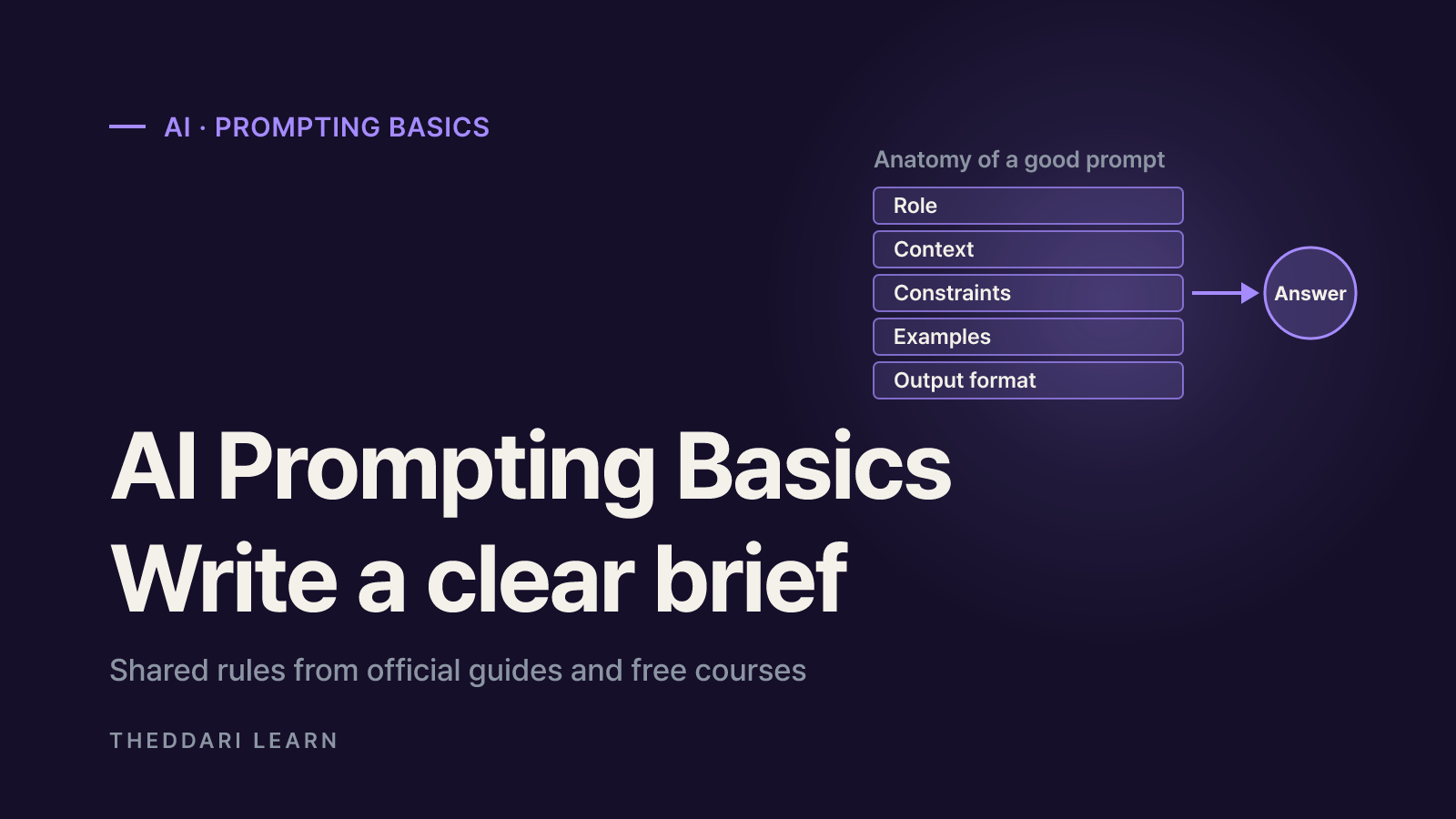
Read the three vendor guides side by side and a common structure appears. The OpenAI Help Center recommends putting instructions first and being specific about context, outcome, length, format and style. Google lists instructions, input, constraints, response format, examples and context as prompt components. Anthropic emphasizes clarity, explaining the reason behind an instruction, examples and giving the model a role. For beginners, five slots cover most everyday tasks.
Role
- What to include
- The perspective or expertise to adopt
- Example phrasing
- You are a patient tutor for adult beginners
Context
- What to include
- Background, audience and purpose
- Example phrasing
- This is onboarding material for non-technical staff
Constraints
- What to include
- Length, tone and what to do instead of what to avoid
- Example phrasing
- Use at most five sentences and define jargon in brackets
Examples
- What to include
- One to a few samples of the desired output
- Example phrasing
- Format: term - one-line definition - everyday analogy
Output format
- What to include
- Table, list, paragraph or JSON
- Example phrasing
- End with a three-bullet summary
Rewrite vague requests into specific ones
OpenAI's guidance advises replacing fuzzy wording such as 'fairly short, a few sentences' with something measurable like 'a 3 to 5 sentence paragraph'. It also suggests separating instructions from source text with delimiters such as ### or triple quotes. Here is the same request before and after applying those ideas.
Before: Summarize this article.
After: You are a business news editor. Summarize the article inside the triple quotes for busy office workers. Give three key facts as bullet points. If something is not stated in the article, write 'not mentioned' instead of guessing.
"""(article text)"""
The revised prompt sets a role, an audience, a length, a format and a fallback for missing information. That last line reflects another shared principle: say what the model should do instead of only listing what it must not do. Anthropic gives a parallel example, suggesting 'write in smoothly flowing prose paragraphs' rather than 'do not use markdown'.
Zero-shot first, then few-shot
A zero-shot prompt contains instructions only; a few-shot prompt adds a handful of examples. OpenAI suggests starting zero-shot and adding examples if results fall short. Google recommends including few-shot examples, keeping their formatting identical, and warns that too many examples can make the model overfit to them. Anthropic suggests three to five examples that mirror your real use case, vary enough to avoid unintended patterns, and are wrapped in tags so they are not confused with instructions.
Five common beginner mistakes
- Asking without a purpose. 'Give me marketing ideas' returns generic advice.
- Add who it is for, which channel or budget applies, and what decision the output will support.
- Cramming everything into one prompt. Research, analysis and writing in one request often leads to skipped steps.
- Google describes prompt chaining: make each step its own prompt and feed one output into the next.
- Listing only prohibitions. 'Never be long-winded' is weaker than 'under 200 characters'.
- Add the reason, for example: 'This will be sent as a text message.'
- Putting long material after the question. Anthropic recommends placing long documents near the top and the query at the end.
- Google gives similar advice for large contexts: supply the material first, then the specific instruction.
- Accepting the first draft. The first answer is a starting point.
- Give specific feedback, rephrase the request, or try an analogous task if the model keeps missing the point.
AI prompting and AI tools: where vendor advice differs
The fundamentals transfer between assistants, but the official guides emphasize different details. The table summarizes what each page said when checked in October 2026; recommendations can change with new model versions.
OpenAI Help Center
- Distinctive emphasis
- Instructions first, delimiters around source text, precise length and format
- Practical takeaway
- Wrap pasted text in ### or triple quotes
Anthropic (Claude)
- Distinctive emphasis
- Explain the why, structure with XML tags, use 3-5 examples
- Practical takeaway
- Label sections with tags such as <document>
Google (Gemini)
- Distinctive emphasis
- Few-shot examples, one consistent delimiter style, direct prompts for Gemini 3
- Practical takeaway
- Pick one format per prompt and stick to it
Sampling settings show the clearest divergence. OpenAI's help article says a temperature of 0 is best for most factual uses such as data extraction. Google's guide, by contrast, strongly recommends keeping temperature and related parameters at their defaults for Gemini 3.x models, noting that lowering them can cause looping or degraded performance. Most consumer chat apps do not expose these controls anyway, so beginners usually gain more by improving the wording.
Check the answer, not just the prompt
A well-written prompt still cannot stop a model from producing confident errors. Google recommends grounding with search when recent facts matter and code execution for calculations. Anthropic suggests asking the model to quote relevant passages from long documents before answering. For everyday use, build a short routine.
- 1
Ask for evidence
Request supporting quotes or links, and when you supply material, limit the model to it: 'Use only the text below.'
- 2
Verify numbers, dates and names
Figures, dates, legal references and proper nouns are where errors hide. Check them against the original source.
- 3
Cross-check
Ask the same question a different way or in a second tool. If answers disagree, go to the primary source.
- 4
Keep a prompt log
Save prompts that worked and note why. Over time this becomes a personal library you can reuse and adapt.
AI news makes good practice material. Pick a trending story from theddari's AI Telegram trends, ask for a three-point summary that flags anything not in the source, then compare the result with the original post. Or collect several posts from the blog trends page and ask for a table contrasting their viewpoints. These pages surface what people are discussing; accuracy still has to be checked against each original source.
 theddari.comTrendsBlog PostsSummarized Naver blog posts
Free AI prompting courses and resources (as of October 2026)
The official documentation is itself a free and current textbook. Pair it with a hands-on course to speed things up. Details below were taken from each official page in October 2026; free access can change without notice, so confirm before enrolling.
OpenAI, Anthropic and Google prompting guides
- Format and length
- Web documentation
- What is free and what to note
- Openly readable
- Best for
- Everyone
Anthropic Prompt Engineering Interactive Tutorial
- Format and length
- 9 chapters with exercises plus an appendix (GitHub)
- What is free and what to note
- Public repo; exercises need an API key or the Google Sheets version; examples use Claude 3 Haiku
- Best for
- Learners who want hands-on reps
DeepLearning.AI: ChatGPT Prompt Engineering for Developers
- Format and length
- 1h40m, 9 video lessons, 7 code examples
- What is free and what to note
- Labeled 'Learn for Free' during the platform beta; graded quiz and accomplishment need PRO; basic Python expected
- Best for
- Beginner developers
DeepLearning.AI: AI Prompting for Everyone
- Format and length
- 7h4m, 21 video lessons
- What is free and what to note
- 3 graded assignments and certificate need PRO ($25/month billed annually or $30/month billed monthly); check free video access when enrolling; no coding needed
- Best for
- Non-technical professionals
The Anthropic tutorial moves from basic structure, clarity and roles to separating data from instructions, output formatting, step-by-step thinking and examples, then to avoiding hallucinations and complex industry prompts. ChatGPT Prompt Engineering for Developers, taught by Isa Fulford of OpenAI and Andrew Ng, covers summarizing, inferring, transforming and expanding text plus building a chatbot. AI Prompting for Everyone targets non-programmers with modules on finding information, using AI as a thought partner, including a lesson on sycophancy, and working with images and code.
A simple plan: spend about 30 minutes reading one official guide, write prompts for three tasks you actually do each week, then open a course chapter only when you get stuck. Revising prompts against real work builds skill faster than stacking certificates.
AI prompting jobs: what to check before you invest time
If the 'prompt engineer' title interests you, start with real job postings and the skills they list. We did not verify hiring or salary data for this guide, so we make no forecast. The official guides hint at what professional work involves: Anthropic advises re-checking techniques against your own evaluations, and OpenAI describes escalating from zero-shot to few-shot to fine-tuning when prompts are not enough. In other words, production prompting includes designing evaluation criteria and testing systematically. A portfolio showing measured before-and-after results, combined with expertise in a specific field, usually says more than a course badge. Be skeptical of ads promising high income from prompting alone.