Contents7 sections
An AI agent sandbox is an execution environment that confines what an agent can affect when it runs code, edits files or opens network connections. The goal is simple: if the model misreads a task or gets manipulated by a malicious document, the damage stays inside a workspace or a disposable virtual machine instead of reaching your laptop, servers or accounts. This guide, based on official documentation and public sources checked in October 2026, explains why isolation matters, how the four common approaches differ and how to estimate cost. It also looks at the October 12, 2026 Launch HN post for Agent37, which put sandbox pricing in the spotlight.
Why an AI agent sandbox matters
A chatbot returns text. An agent runs shell commands, installs packages, rewrites files and calls APIs, so a single model output can become a real change to a real system. The OWASP entry on Excessive Agency (LLM06:2025) traces the resulting risk to three root causes: excessive functionality, excessive permissions and excessive autonomy. The trigger might be a hallucination from a weak model or a prompt injection planted by a user, a web page, a compromised extension or another agent. Whatever the trigger, the wider the agent's reach, the bigger the incident.
The key principle is not to treat the model as a security boundary. OWASP recommends enforcing authorization in downstream systems rather than letting the LLM decide what is allowed. A sandbox applies the same idea to the runtime: the operating system or a virtualization layer enforces which files, processes and hosts are reachable, regardless of what the agent intends. That creates a line the model cannot argue its way across.
What a sandbox does and does not protect
A sandbox protects the host. It does not protect secrets you hand to the agent. One commenter in the Hacker News thread put it bluntly: connect a Google account and the agent gets everything that account can do, sandbox or not. Anthropic's Claude Code sandboxing documentation shows how much depends on configuration. With the Bash sandbox on, writes are limited by default to the working directory and a temp directory, and network traffic must pass a proxy whose allowed-domain list starts empty. Reads, however, cover most of the machine by default, including ~/.ssh and ~/.aws/credentials, and environment variables, secrets included, are inherited. Protecting credentials requires explicit deny or mask rules.
Agent isolation options: OS policies, containers, gVisor and microVMs
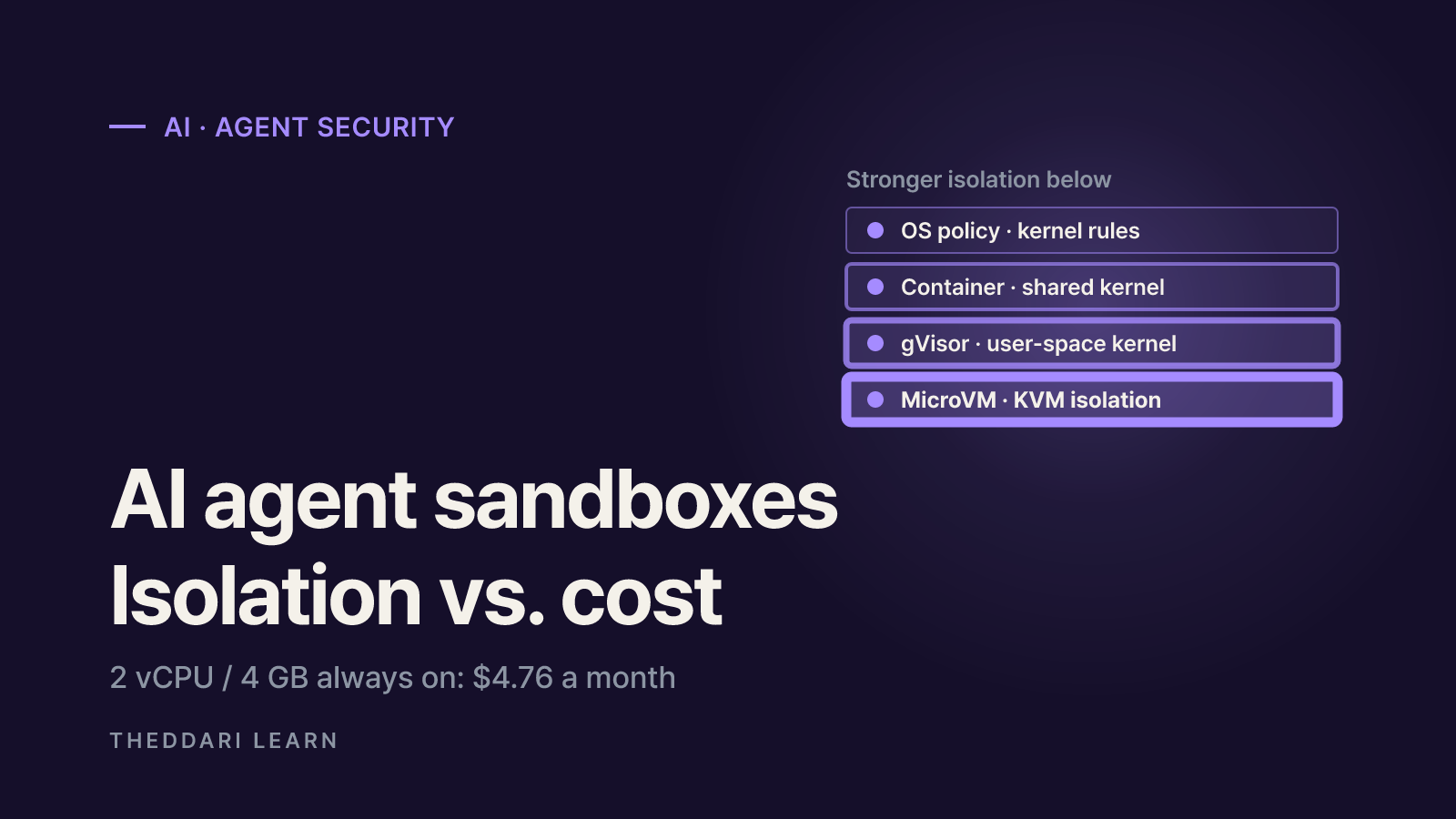
Agent isolation falls into four broad tiers. Moving down the table generally puts more distance between the agent and the host kernel, at the price of startup speed, compatibility or how many sandboxes fit on one server. Real products can be configured more or less strictly, so read the table as a description of each approach rather than a ranking of vendors.
OS-level policy
- Boundary
- Rules enforced by the host kernel (Seatbelt, bubblewrap, seccomp)
- Strengths
- Easy to adopt, native performance
- Trade-offs
- Hard to write a correct policy for arbitrary programs
- Examples
- Claude Code Bash sandbox
Plain container
- Boundary
- Namespaces and cgroups on a shared host kernel
- Strengths
- Fast start, familiar tooling
- Trade-offs
- Shared kernel leaves container-escape risk
- Examples
- Docker or Podman dev containers
gVisor
- Boundary
- Per-sandbox user-space application kernel (the Sentry)
- Strengths
- Low fixed overhead, flexible memory use
- Trade-offs
- Not every syscall implemented; syscall-heavy work is slower
- Examples
- Agent37 default sandboxes
MicroVM
- Boundary
- KVM hardware virtualization plus the jailer
- Strengths
- VM-level isolation with its own guest kernel
- Trade-offs
- Needs hardware virtualization; guest images to manage
- Examples
- Firecracker (integrated by E2B, Fly.io and others)
The gVisor documentation describes gVisor as an application kernel written in Go, a memory-safe language, that runs in user space. It intercepts application system calls and services them in a component called the Sentry, while a separate Gofer process mediates file access. The project says this delivers many of the security benefits of a VM with the resource footprint and fast startup of a normal process, but it is candid about the cost: reduced application compatibility and higher per-syscall overhead. The same page notes that machine-level virtualization struggles to reach high density, and that rule-based tools like seccomp are very hard to apply to arbitrary, previously unknown programs.
Firecracker is the Rust virtual machine monitor AWS built for Lambda. It uses Linux KVM to create microVMs and exposes only five emulated devices to keep the attack surface small. The project publishes figures of under 125 ms to boot, under 5 MiB of memory overhead per VM and up to 150 microVMs created per second per host, and it adds a jailer process as a second line of defense if the virtualization barrier is ever breached. Those numbers come from the project's own test conditions; your cold-start time will depend on image size and whether you resume from snapshots.
Security strength versus density
In the launch post, Agent37's founder said the company chose gVisor because sandboxes can share host memory instead of each reserving a full VM's allocation. The trade-off is that its gVisor sandboxes do not support workloads such as Docker-in-Docker or Android emulators, which are offered on pricier full-VM sandboxes. One commenter argued that gVisor is less secure than VMs, making a price comparison against VMs unfair; the founder replied that networking and other capabilities are restricted to compensate. Which side matters more depends on your threat model. A personal assistant running your own code needs a different boundary from a service that executes code uploaded by strangers.
How sandbox pricing works
Managed sandboxes usually meter vCPU, memory and disk separately, stop compute charges while a sandbox sleeps and keep billing for retained disk. Agent37's pricing page, checked in October 2026, lists $0.80 per vCPU, $0.70 per GB of RAM and $0.09 per GB of disk for a 730-hour month, metered by the minute. Applying those published rates to a 2 vCPU, 4 GB RAM sandbox with 4 GB of disk gives the following.
Compute, always on (730 hours)
- Calculation
- 2 × 0.80 + 4 × 0.70
- Result (USD)
- 4.40
Disk retained all month (4 GB)
- Calculation
- 4 × 0.09
- Result (USD)
- 0.36
Always-on total
- Calculation
- 4.40 + 0.36
- Result (USD)
- 4.76
Running 57 hours, then deleted
- Calculation
- (4.40 + 0.36) × 57 ÷ 730
- Result (USD)
- about 0.37
The headline average of $0.37 per sandbox per month in the launch post reflects that kind of mostly-asleep usage. The founder said free-tier infrastructure costs about $0.05 to $0.10 per user per month, and later clarified that this comes mainly from capping free users at roughly 10 awake hours per week rather than from packing density. Other cost levers he cited were renting servers from Hetzner and OVH instead of hyperscalers and buying RAM-heavy hosts, because agent workloads burst on CPU but are usually bottlenecked on memory. The Performance tier costs four times the compute rate, and model tokens, search and integrations are billed separately.
The page also compares 31 providers using list prices the vendor collected on October 1, 2026. It states that this compares prices, not throughput, and that free allowances, actual CPU usage and discounts can change the cheapest option. Treat it as a starting point for your own math rather than an independent ranking.
Latency and operating costs the price list leaves out
Cheap sandboxes typically save money by sleeping aggressively, which can lengthen cold starts. Agent37's founder said a frequently used sandbox wakes in under a second from local NVMe, while a rarely used one restores more slowly from cold object storage. Cron jobs inside a sleeping sandbox never fire, so the team built an external API to wake sandboxes on schedule. A user who runs freshly launched open-source projects in sandboxes every day reported that egress allowlists, clean environments with no inherited secrets and per-run wall-clock timeouts cost more time than CPU or RAM ever did. Session length caps and disk retention rules differ by provider as well.
How to choose an isolation setup
- 1
List what the agent actually needs to do
Write down whether it needs file reads and writes, shell access, package installs, a browser or external APIs. Following OWASP, the cheapest isolation is not granting tools and functions the task does not require.
- 2
Decide whose code will run
Your own repository and requests, code pulled from the internet, or code uploaded by customers sharing a host each call for a different boundary. Match the threat to an OS-level policy, container, gVisor or microVM.
- 3
Design network and credential boundaries separately
Restrict outbound connections with a domain allowlist and avoid placing raw API keys inside the sandbox. A proxy that injects credentials at request time, or read-only and short-lived tokens, keeps keys from leaking even if the agent is fooled.
- 4
Check what happens when the sandbox fails
Claude Code runs commands unsandboxed by default if the sandbox cannot start, and it can ask to retry a blocked command outside the sandbox. If isolation is a security requirement, close those paths with settings such as failIfUnavailable and allowUnsandboxedCommands.
- 5
Price it with real runtime and memory
Measure monthly awake hours, peak memory and the disk you need to keep, then apply each provider's rates. Run a short trial to confirm that cold starts and session limits fit your workflow.
Agent sandboxes and coding-agent tools ship new releases quickly. theddari's AI Telegram trends and blog trends pages collect which agent tools and security issues are being discussed, which helps you spot new options. Confirm the isolation model and pricing in each provider's official documentation before relying on any of them.
 theddari.comTrendsBlog PostsSummarized Naver blog posts
Bottom line: match the boundary to the threat and the bill to runtime
An AI agent sandbox assumes the model will sometimes be wrong or deceived and fixes the blast radius in advance. For personal work on your own code, an OS-level sandbox or a container is a reasonable start. For untrusted code or multi-tenant services, consider a thicker boundary such as gVisor or a microVM. Whatever you pick, credentials and network egress need their own design, because keys placed inside the sandbox are not protected by it. On cost, awake hours and memory size matter more than the headline rate, so recalculate vendor comparisons with your own usage and test cold starts and compatibility limits before committing.